TikTok Music Copyright: How to Add Songs Without Getting Muted (2026)
Photo: Mink Mingle, Wikimedia Commons (CC0).
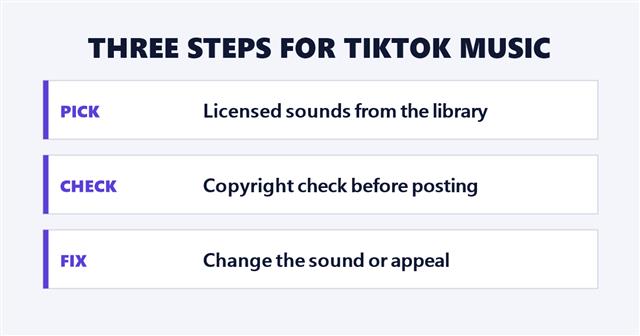
TikTok music copyright is the reason some videos suddenly lose their sound. TikTok says a sound can go missing from a video because it was muted for copyright reasons, and it has built tools to help creators avoid that: a library of licensed sounds, a pre-check before posting and an appeal process.
This guide explains how TikTok music copyright tools work, where to find each one and what to do if a video is muted. It is based on three TikTok Creator Academy articles, Avoiding copyright issues when adding music to your video, Turning up the volume with TikTok’s Unlimited Sound Library and The importance of sound, read on October 8, 2026. This is a summary of TikTok’s guidance, not legal advice, and TikTok changes these tools often.
What to know:
- The safest route: TikTok says the Unlimited Sounds Library offers fully licensed, free-to-use sounds, and that it handles the copyright concerns.
- Before you post: the TikTok Studio app and web version have a “Music copyright check” toggle that warns you about problems before posting.
- If you are muted: you get an inbox notice and a “Change sound” prompt, and you can either replace the audio or appeal.
- Business accounts: the Unlimited tab is not available, so TikTok points to its Commercial Music Library.
In this article
How TikTok Music Copyright Gets Videos Muted
Creator Academy opens its guidance with a familiar problem: “Have you ever had a sound go missing from your video? It may have been muted due to copyright reasons.” In plain terms, if a video uses music that TikTok cannot clear for that use, TikTok can mute the music or remove the sound.
TikTok’s own advice for TikTok music copyright is to use “licensed music or original audio that you have the rights to.” The tools below are TikTok’s way of making that simpler.
The Unlimited Sounds Library
Creator Academy says “the best way to avoid copyright issues is to use TikTok’s in-app tools to add music to your videos,” and points first to the Unlimited Sounds Library. One article describes “tens of thousands of fully licensed, free-to-use sound and music options” and says “all copyright concerns are handled by TikTok.” A second article puts the size at “80k+ authorized sounds,” most of them “pure music,” including “today’s hottest pop hits, moody instrumentals, and more.”
What TikTok says it includes
- Sounds “of any length and frequency” for videos “of any length worldwide.”
- No restrictions on usage duration or amount, so you can use “as many sounds as you want for as long as you want” without getting muted, per TikTok.
- On desktop, a search bar, filters by theme, style or duration, sorting by “hot” or “new,” a Favorites tab and themed playlists.
How to find it
In the app, open “Sounds” and click the “Unlimited” tab. Staying inside this library is the simplest way to keep TikTok music copyright worries off your plate, according to TikTok’s pitch. TikTok also gives a desktop address for the library inside TikTok Studio, linked from its Creator Academy article. TikTok’s own explainer video is below.
@creatoracademy 🎶 Want to take your videos to the next level? Check out the Unlimited Sounds Library for endless tunes and vibes! #creatoracademy #tiktokfeatures
♬ original sound – Creator Academy – TikTok Creator Academy
Credit: @creatoracademy/TikTok.
Business Accounts and the Commercial Music Library
There is one catch. Per Creator Academy, the Unlimited tab “won’t be available if you’re using a business account.” Business accounts are pointed to TikTok’s Commercial Music Library instead.
TikTok describes that library as having “over 1 million sounds and songs cleared for you to use,” including “a special playlist with sounds longer than 60 seconds” for longer videos. TikTok music copyright works differently for brand accounts, so check which library your account can use before you pick a song.
Using More Than One Track
Creator Academy says the EditorPro tool, available in TikTok Studio and the TikTok Studio app, “now lets you add multiple music tracks to one video.” The steps TikTok gives:
- Go to the Unlimited Sounds Library.
- Tap “Add sound” in the music menu.
- Add up to 20 songs of your choosing.
TikTok adds a restriction: “It’s currently available for creators with 10k+ followers on all 1 minute+ videos.”
The TikTok Music Copyright Check
Both the TikTok Studio app and the web version offer what Creator Academy calls a “music copyright pre-check.” You turn on the “Music copyright check” switch on the posting page. If there is an issue, TikTok says “you’ll get a warning before posting with prompts to help you replace the sounds.”
This is the cheapest protection in the whole TikTok music copyright toolkit, because it runs before you publish. The Creator Academy article does not say how accurate the check is or whether it catches every case, so treat it as a warning system, not a guarantee.
What to Do If Your Video Is Muted
How you find out
If a video is muted or a sound is removed, TikTok says you will get a notification in your inbox, and a “Change sound” prompt will appear on your profile page and the video details page. If only some of the music breaks the rule, “only that section will be removed.” Your voice, sound effects and other audio keep playing, and you can replace the music.
Your two options
- Change sound: pick a new track from the Unlimited Sounds Library. TikTok says the video updates and the audio is restored once you choose.
- Appeal: if you think the mute was a mistake, select “Appeal” and give an explanation. TikTok says it will review the appeal and tell you the result. If it is approved, the violation is removed and the audio is restored. If it is denied, you can still change the sound.
Sound Tips From TikTok
Creator Academy also treats sound as part of making a video work. It notes that opening TikTok is a “full-screen experience, sound-on experience,” and gives three tips:
- Match your sound to your video’s vibe.
- Try syncing your actions with the beat.
- Use sounds that are already buzzing in the community.
TikTok also advises picking sounds that match the length of your video, especially if it runs longer than a minute. For how audio trends spread on this site, see TikTok trending sounds strategy and the Two Fishes audio trend. If you want a shortcut to a trend, see how TikTok templates work.
What TikTok Music Copyright Guides Do Not Cover
- Account penalties: the three articles read for this guide do not describe what happens after repeated copyright problems.
- Other people’s sounds: they do not explain whether reusing a sound from another creator’s video is safe in every case.
- Eligibility changes: the 10,000-follower requirement for multiple tracks is TikTok’s current rule and can change.
- Library size: TikTok’s two articles describe the Unlimited library as “tens of thousands” and “80k+” sounds, so the exact number is not clear from TikTok’s own wording.
Frequently Asked Questions
Why was my TikTok video muted?
Per Creator Academy, a sound can be muted for copyright reasons. If only part of the music is the problem, only that section is removed.
How do I avoid TikTok music copyright problems?
TikTok recommends adding music through its in-app tools, especially the Unlimited Sounds Library, and turning on the “Music copyright check” before you post.
Does TikTok music copyright work differently for business accounts?
Per Creator Academy, yes. Business accounts do not see the Unlimited tab and are pointed to the Commercial Music Library, which TikTok describes as having over 1 million cleared sounds and songs.
Can I appeal a muted video?
Yes. Tap “Change sound” on the notification or video details page, then choose “Appeal” and explain why you think the mute was a mistake. TikTok says it will review it and notify you.
Is the Unlimited Sounds Library free?
TikTok describes its sounds as “free-to-use” and “free authorized sound options.” Business accounts do not get the Unlimited tab and are pointed to the Commercial Music Library.
How many songs can I add to one TikTok video?
Up to 20, through EditorPro and the Unlimited Sounds Library, for creators with 10,000 or more followers on videos of one minute or longer, per Creator Academy.
Sources: TikTok Creator Academy articles Avoiding copyright issues when adding music to your video, Unlimited Sound Library and The importance of sound, read October 8, 2026.