TikTok Business vs Personal Account: What Creator Academy Says Each Includes (2026)
The TikTok business vs personal account choice is explained on one Creator Academy page, and TikTok backs it up with two longer pages on Business Accounts. TikTok says it offers “two different types of accounts, Personal and Business, each with features tailored to your unique needs.” This guide reports what TikTok says each one includes, with every claim credited to TikTok.
This guide to the TikTok business vs personal account question reports three pages: Choosing the right TikTok account for you: Business vs. Personal, Level up Your Brand With a TikTok Business Account and A Deep Dive Into TikTok Business Analytics (all read November 15, 2026).
TikTok business vs personal account at a glance:
In this article
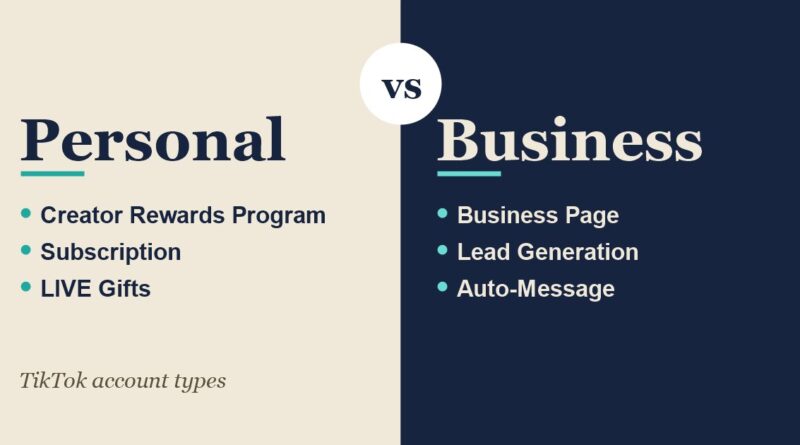
- Personal Account: TikTok says it is for people who are “just here to be entertained, share your stories, or connect with your community as a creator, artist, or public figure.”
- Business Account: TikTok says it is for those “stepping into TikTok with your brand, retail shop, organization, or services.”
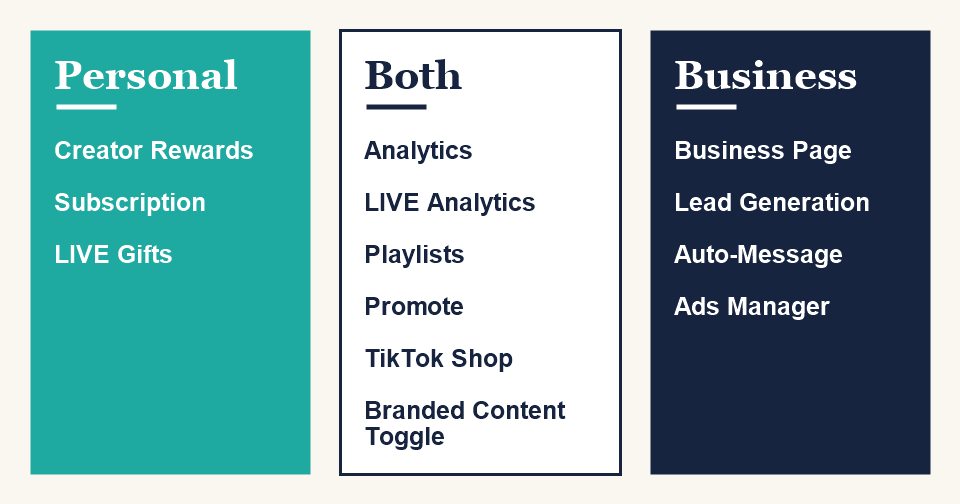
- Shared features: TikTok says both get Analytics, LIVE Analytics, Playlists, Promote and a Branded Content Toggle.
- Business Account extras: TikTok lists Profile Attributes, a Business Page, Lead Generation, Auto-Message, TikTok Ads Manager and a Commercial Music Library.
Choosing Between the Two Account Types
TikTok’s page frames the TikTok business vs personal account decision as a question of purpose. It says “If you’re just here to be entertained, share your stories, or connect with your community as a creator, artist, or public figure, the Personal Account is your perfect match. Now, if you’re stepping into TikTok with your brand, retail shop, organization, or services, the Business Account is your best bet.”
The page adds that the Business Account is “designed with all the tools to help businesses of any size flourish on the platform.” It also says that “No matter which account you pick, you’ll get to play around with awesome TikTok features like Analytics, LIVE Analytics, Playlists, Promote, and even a Branded Content Toggle.” Those shared features are the common ground between the two sides of the TikTok business vs personal account choice.
What a Personal Account Offers
For the personal half of the TikTok business vs personal account choice, TikTok describes a Personal Account as one that “can help you shine as an individual, giving you access to features made for flexing those creative muscles and collecting rewards for your hard work.” Getting started is described as “as easy as creating a TikTok account,” and the page links to TikTok’s own walkthrough for that.
The Personal Account side of the TikTok business vs personal account page focuses on ways to earn. TikTok lists four:
- Creator Rewards Program: TikTok says it is “Exclusively for Personal Account holders” and “rewards you for posting high-quality, original content over 1 minute long.”
- Subscription: creators can “Offer exclusive content to your most dedicated fans for a monthly fee.” Subscribers get special emotes, customized perks and subscriber-only chats, and TikTok adds that subscriber badges and exclusive LIVEs “add a real VIP feel.”
- TikTok Shop: TikTok describes guiding followers “through a virtual shopping spree with your videos and LIVE sessions,” making “shoppable content a breeze.”
- LIVE Gifts: viewers can send virtual gifts during a LIVE, and TikTok says “The more popular your video, the more Diamonds you’ll collect!”
TikTok attaches a note to the list: “Please note that the availability of these programs may differ by region.”
What a Business Account Offers
On the business half of the TikTok business vs personal account choice, TikTok says that if you are “running a brand, big or small, and looking to make a splash on TikTok, switching to a Business Account can help you build a more vibrant and engaging brand presence.” Its second page says a Business Account can help “drive brand awareness, find monetization solutions, connect with your audience and achieve your marketing goals.”
The first page gives the steps to switch in the app:
- Head to your profile and tap the menu bar (three lines) in the top right hand corner.
- Tap “Settings and privacy.”
- Tap “Account.”
- Choose “Switch to Business Account.”
After that, TikTok says to “sign up with a Business Registration to verify that this business is all yours.” Once registered, the account can show its business category on the profile and unlock features such as a link-in-bio and an app download link, per the page.
Registered and Non-Registered Business Accounts
The second Creator Academy page adds a distinction that the TikTok business vs personal account page does not make. When you set up an account as a business, TikTok says “you can select from two options: Registered or Non-Registered.”
- Non-Registered Business Account: gives “access to basic business-oriented features, such as detailed performance metrics (analytics), the ability to add links to your profile, and some advertising options.”
- Registered Business Account: in addition to the basics, it receives “exclusive functionalities.” TikTok names advanced advertising tools like TikTok Ads Manager and features such as TikTok Shop, “depending on the region.” Registered accounts can display their business category, receive an official “profile identifier” and get “priority access to new and existing business features.”
TikTok also addresses a common question about badges. It says that when you create a Business Account, “you won’t automatically receive the coveted blue checkmark. This badge is reserved for high-profile accounts, such as celebrities, major brands, and governments.”
The Business Suite Tools
TikTok calls the Business Suite “an incredible collection of tools for creativity, engagement, and conversion.” The page lists six tools, which are the main difference in the TikTok business vs personal account comparison:
- Profile Attributes: your email, phone number and address, which “make it super easy for folks to reach out to you.”
- Business Page: described as “your TikTok storefront,” a tab on the profile with a photo gallery and a business info section.
- Lead Generation: lets you “collect leads right from your profile, videos, and LIVE events” with calls to action like “Get quote” or “Sign up.”
- Auto-Message: “a cool set of DM features just for Business Accounts,” including welcome messages, keyword auto-replies and suggested questions.
- TikTok Ads Manager: pairing it with a Business Account opens advertising options, and TikTok names Spark Ads and TikTok Shopping Ads.
- Commercial Music Library: TikTok says it offers “over a million tracks” with “zero copyright woes.”
The Business Page and Profile Features
In the TikTok business vs personal account comparison, the second page describes the Business Page as “an in-app profile tab that offers publishers a new way to spotlight owned content and showcase business information” in one place. It says the page “currently supports two modules”:
- Business information: a website, an app download link and other contact details in one place.
- Photo gallery: “a collection of photos or promotional posters” to give “a visual snapshot of what your brand has to offer.” TikTok marks this one as “Available in select regions.”
For the profile itself, TikTok says a Business Account gives “exclusive profile features to help showcase important brand information and drive traffic to your website or app.” It groups them as business info and contact (email, phone number, address) and conversion tools (link-in-bio, app download link).
Creative Hub and Post Scheduler
Two more Business Account tools in the TikTok business vs personal account picture appear on the second page. The first is the Creative Hub, which TikTok describes as “an in-app source for content inspiration and trends that’s only accessible in our business suite.” It says brands can find trending hashtags, trending commercial sounds and trending videos from other high performing Business Accounts for their specific industry.
The second is the Post Scheduler. TikTok says it lets publishers “schedule organic posts from 15 minutes up to 10 days in advance on the web upload page,” and that a scheduled post “will be visible on both the web version and the app version of TikTok.”
Business Analytics
The third page of this TikTok business vs personal account guide covers Business Analytics, which TikTok says helps a business “Understand Your Audience,” “Measure Content Performance” and “Optimize Your Strategy.” It gives the path to the tool as Profile, then Menu, then Business suite, then Analytics. The page groups the data into four areas.
Overall Metrics
TikTok calls the overall metrics “the bread and butter of your Business Account Analytics.” They include profile views, follower count and the rate at which followers were gained or lost, audience interactions (an engagement rate based on likes, shares and comments) and reporting windows that run “from seven days to one year of insights.”
Content Performance
For video-by-video analysis, TikTok says “the most important metrics are” average watch time and video finish rate. It also lists audience retention, described as the percentage of viewers who watched the entire video, and the engagement rate.
Audience Demographics
The audience section lists age, gender, location (including the top 10 cities and countries) and interests, plus the times and dates when followers are most active. It also covers the distribution of video viewers, with TikTok noting that “not all video viewers are necessarily followers of your account,” data on the reached and engaged audience, and traffic source, showing whether people found a video through the For You page, the following tab or search.
Reach and Conversion
For the TikTok business vs personal account comparison, TikTok says it added “several new reach and conversion tracking metrics at the account and individual video levels.” They are lead submissions, bio-link clicks, download link clicks, email clicks, address clicks and clicks on the phone number, each counted over a selected time range or after one specific video.
On reading the numbers, TikTok says “Fluctuations are normal” and “don’t be discouraged if not all your content performs.” Its tip is to “regularly review your analytics and note differences in watch time and other factors.”
What TikTok’s Pages Do Not Say
Several details that matter in the TikTok business vs personal account decision are not on the three pages. The pages do not say what a Business Registration requires, how long it takes or whether it has a cost. They do not give a price for any Business Suite tool, and they do not say whether an account can switch back from Business to Personal. The Creator Rewards Program is described as exclusive to Personal Accounts, but the pages do not explain what a business that also creates content would lose or keep. Availability is also tied to region for several features, and the pages do not list which regions.
Other guides built on TikTok’s Creator Academy: Creator Search Insights, TikTok Effect House and the For You Feed. For TikTok’s commerce side, see TikTok Shop Plus and TikTok Shop Black Friday 2026.
Frequently Asked Questions
What is the difference in a TikTok business vs personal account?
Per TikTok’s Creator Academy, a Personal Account is for entertainment, sharing stories and building a community as a creator, artist or public figure, with rewards such as the Creator Rewards Program, Subscription, TikTok Shop and LIVE Gifts. A Business Account is for brands, shops, organizations and services, with Business Suite tools such as a Business Page, Lead Generation, Auto-Message and TikTok Ads Manager.
How do I switch to a Business Account?
TikTok’s steps are to tap the menu on your profile, then “Settings and privacy,” then “Account,” then “Switch to Business Account.” TikTok then says to sign up with a Business Registration to verify the business.
Does a Business Account get a blue checkmark?
No, not automatically. TikTok says the badge “is reserved for high-profile accounts, such as celebrities, major brands, and governments.”
Which should I choose in the TikTok business vs personal account decision?
TikTok frames the TikTok business vs personal account choice as a matter of purpose: Personal for entertainment, storytelling and community as a creator, artist or public figure, and Business for a brand, retail shop, organization or services. The pages do not give a rule beyond that.
Do both TikTok business vs personal account types get analytics?
Yes. TikTok lists Analytics and LIVE Analytics as features of both. Business Analytics, with overall, content, audience and conversion metrics, sits in the Business Suite.
Sources: TikTok Creator Academy: Business vs. Personal, Level up Your Brand With a TikTok Business Account and A Deep Dive Into TikTok Business Analytics, read November 15, 2026. This guide reports what TikTok says and has not tested the features. TikTok is a trademark of its owner; this site is not affiliated with TikTok.