Creator Search Insights: What TikTok Says the Search Tool and Search Analytics Do (2026)
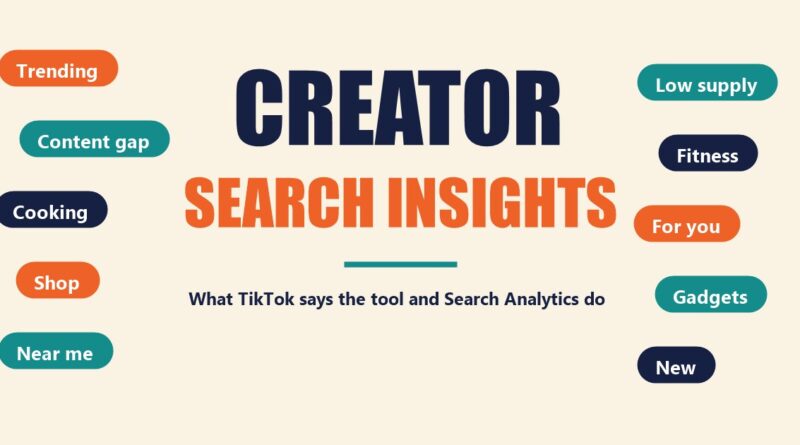
Creator Search Insights is a TikTok tool that shows creators which topics people are searching for. TikTok’s Creator Academy describes it as “your go-to tool for detailed insights into trending search topics,” and says it can also help creators in the Creator Rewards Program.
This guide to Creator Search Insights reports what TikTok says on seven Creator Academy pages: Creator Search Insights, Finding Creator Search Insights, Understanding the Detail Page within Creator Search Insights, Raising your Search ratings with the Content gap tab, Positioning your content for discovery: why Search Analytics matter Supercharge your TikTok Shop strategy with Creator Search Insights and Working smarter (not harder!) with AI Outline. TikTok changes its tools, so everything below is a snapshot of TikTok’s own description as read on October 28, 2026. This site adds no advice and no analysis.
What to know:
- What it is: a tool for browsing “popular search topics,” with AI-powered tips, a Content Gap filter and a detail page for each topic, per TikTok.
- AI Outline: a feature TikTok describes as turning topics into video plans “complete with hooks, titles, hashtags, and a full script outline.”
- How to open it: type “Creator Search Insights” in TikTok’s search bar, press enter, then tap View. You must be logged in for the personalized homepage.
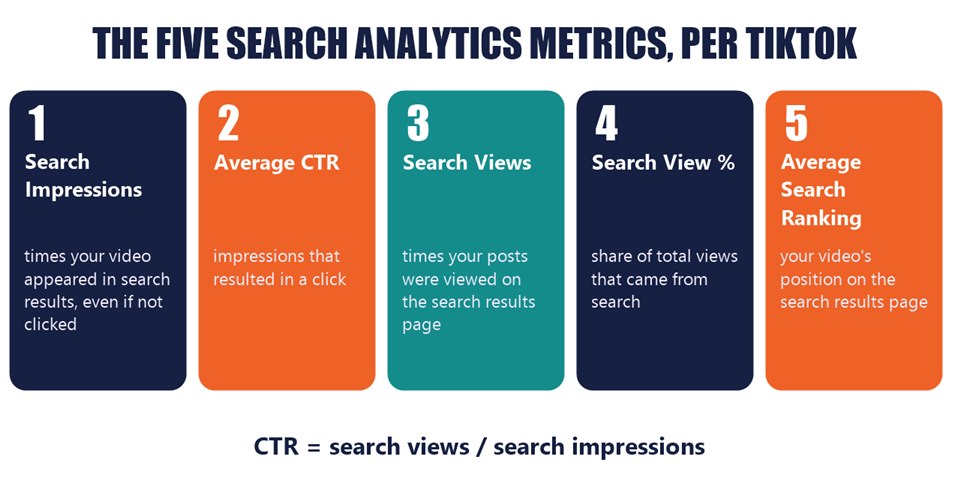
- Search Analytics: a separate view of how your own videos perform in Search, built on five metrics: search views, search view percentage, search impressions, average click-through rate and average search ranking.
- Limits: the topic list shows “a minimum of 100 and a maximum of 500 search topics,” and “Searches by Followers” needs at least 1,000 followers.
In this article
What Creator Search Insights Is
TikTok’s main Creator Academy page opens: “If you’re looking for opportunities to create search-friendly content and potentially amp up your audience engagement, you’re in luck! Meet Creator Search Insights, your go-to tool for detailed insights into trending search topics.”
According to TikTok, Creator Search Insights lets you “scroll through popular search topics, dive deeper into specific interests, and even filter for areas with low supply.” The page calls its “content gap” search topics “hidden gems” that offer “the most promising opportunities with low supply.”
TikTok says the tool is “for TikTok creators who want to boost their content’s traffic and engagement with insights into trending search topics.” It adds that using it “can help increase your rewards in the Creator Rewards Program (if you’re enrolled).”
A separate Creator Academy page on Finding Creator Search Insights describes the tool as offering “personalized insights into popular search topics on TikTok” that can “help you source inspiration for your content, tailor creative strategies to your audience, and identify untapped content opportunities.”
How to Find Creator Search Insights
TikTok’s Creator Academy gives two routes to Creator Search Insights. The page introducing the tool says to “tap the search button in the upper right corner of your for you feed in-app and type: ‘Creator Search Insights’, then press ‘View’.”
The Finding Creator Search Insights page describes the same route from the search bar: “Type ‘Creator Search Insights’ in TikTok’s search bar then press enter,” then tap View to reach your personalized homepage. It notes that you “must be logged in to your TikTok account for a personalized Creator Search Insights.”
The second route is TikTok Studio, for English-speaking regions. TikTok says to navigate to your profile, select the menu in the top right corner, then TikTok Studio. “From there, scroll to ‘Creation inspirations,’ tap ‘Recommended,’ then select ‘Searched for.’ Click on any topic to view its details.”
If the tool is not yet available where you are, TikTok says to “tap ‘Notify me’ to subscribe to notifications about availability.” For more on the Studio side, see this site’s guide to TikTok Studio.
Trending Topics and AI Tips in Creator Search Insights
Once Creator Search Insights is open, TikTok says “you’ll see suggested topics right away.” Its page says to “tap the Trending tab to browse what’s rising now, or filter by category to find trending ideas in your niche.”
TikTok describes the next step this way: “Tap any topic to unlock AI-powered tips, from suggested video ideas to must-use keywords.” The page also says you can “bookmark your favorites, or even jump straight into creating new content” from inside the tool, and that the camera icon starts filming once you have picked a topic.
TikTok frames the Trending tab around speed: “Trends move quickly, but Creator Search Insights helps you catch them while they’re hot. It surfaces what people are actively searching for.”
The Content Gap Filter
The Content Gap filter has its own Creator Academy page as well as a step on the main one. Per the main page: “Turn on the Content Gap filter to see topics people are searching for that don’t have sufficient results.” TikTok calls these “little pockets of ‘high demand, low supply.'”
TikTok says a content gap can mean either of two things:
- “Not enough videos on a topic”
- “plenty of videos… but not enough quality ones”
A second Creator Academy page, titled Raising your Search ratings with the Content gap tab, says the tab finds “video topics that have lots of searches but not many high-quality videos yet.” It says that when creators make high-quality, informative videos that address content gaps, they are “more likely to get higher watch times, improved retention, higher search rankings, and more views overall.”
TikTok gives an example. If a viewer searches for “The best dairy-free ice cream in San Francisco,” and nothing relevant comes up, the viewer might type a less specific search, like “Best desserts in San Francisco.” TikTok says that makes it more likely the results are “too general, leading them to skip videos and move on to other topics.” If the first search had returned content that matched exactly, TikTok says “there’s a high chance they’d watch the full video and engage with it.”
Where the Content Gap tab is
- Tap the Search icon in the upper-right corner of your For You feed.
- Type “Creator Search Insights,” then press View.
- Under Suggested, click Content gap.
TikTok adds that under each topic you can “view other videos that are performing well to get inspired,” and that the refresh button finds “more topics that might be relevant to your niche.”
On staying within a niche, the main page says: “When you explore gaps, keep your niche top of mind. You want to reach new audiences without wandering so far that you confuse your current followers.”
The Detail Page
Tapping a topic in Creator Search Insights opens its Detail Page. TikTok’s page on the Detail Page says it lets you “pinpoint exactly which kind of niche topics are being searched.” The main page lists what it shows: “popularity trends over the past week, browse related videos, and explore connected search terms.”
Search popularity
The search popularity graph “shows the frequency a topic has been searched over the past week,” and TikTok says “a higher popularity score means more users are actively searching for that topic.” Two controls sit above it:
- Filter by time and region: switch “from ‘Global’ to specific regions” or change the timeframe “from the default ‘Last 7 days'” to see longer-term trends.
- Demographic details: tap ‘View demographic details’ for “a breakdown of the age, gender, and location of the users searching for this topic.”
Related videos and related topics
The related videos section, per TikTok, can give “an insider’s view of the type of content trending around a certain topic.” TikTok says you can watch them “to gather ideas and inspiration for your own content and spot any trends that might be missing a fresh take,” and “explore additional, related topics to discover what else people are searching for within that theme.”
For topics with a content gap, TikTok says to check the related videos because “content on the subject is limited.” Its listed “pro tip” is: “Use relevant hashtags connected to your topic to help boost your reach and visibility in search results.”
AI Outline
A seventh Creator Academy page, Working smarter (not harder!) with AI Outline, covers a feature inside Creator Search Insights. TikTok says that “with AI Outline, you can turn those opportunities into fully formed video plans in seconds, complete with hooks, titles, hashtags, and a full script outline tailored to your topic.”
To find it, TikTok says to search “Creator Search Insights” on TikTok and “select any topic to view its AI Outline page.” On that page TikTok says you will see “AI Suggested hooks, titles, and hashtags,” which you can “refresh or filter them anytime,” and which you can ask to be shorter or to be written “as a question.”
Lower on the page is a Script section with “a full, structured outline.” TikTok lists what it includes:
- Intro suggestions
- Core talking points
- A highlight moment for retention
- A climatic build
- An engagement-driven outro
TikTok says you can edit the script by hand, “or have AI refine it to match your style,” with example prompts such as “Refine the hook to be more engaging” and “Make this script a tutorial.” Saved outlines go to Favorites: “your outline will appear in Favorites under ‘My Outlines.'”
Not every topic has an outline. TikTok says that if a topic does not offer an AI Outline yet, “you’ll still get AI-generated creator tips,” including “a simple explanation of the topic,” “recommended keywords,” “hook best practices” and “a clear approach for the video.”
Searches by Followers
Creator Search Insights also includes a tool called Searches by Followers. TikTok says it “reveals your audience’s top questions and trends, helping you deliver content that resonates with them,” and that you can find it “right on the Creator Search Insights homepage.”
TikTok attaches a requirement: “this feature is available to users with 1,000+ followers.” The FAQ repeats it: “You need at least 1000 followers to view ‘Searches by Followers.'”
TikTok also addresses topics that do not match a creator’s niche: “Not all searches will line up perfectly with your niche, and that’s okay! Your followers have varied interests, and your niche is already one of them.”
Search Analytics: The Five Metrics
Search Analytics covers how your own videos perform in Search. TikTok’s Creator Academy says “more and more users are relying on TikTok Search to find what they are looking for,” and that Search Analytics helps creators “understand how your content is performing in Search and adjust your strategy accordingly.”
TikTok lists three things creators can do with the insights: “Understand Search Trends,” “Increase Visibility” and “Connect with your Followers.” To reach it, TikTok says to open the search icon, search “Creator Search Insights,” press View, then “press the Search Analytics banner.” The page says the banner opens “the 5 most important search metrics” and that tapping the i icon lets you “see their definitions.”
What each Search Analytics metric means
- Search Views: “the number of times your posts were viewed on the search results page.” An up arrow means the metric “has increased compared to a similar period in the past.”
- Search View Percentage: “the percentage of total views that came from the search results page and search feed.” TikTok says “the higher this number, the more search-friendly your content is for the time period selected.”
- Search Impressions: “how many times your video appeared in search results, even if it wasn’t clicked.”
- Average Click-Through Rate (CTR): “the percentage of impressions from the search results page that resulted in a click.” TikTok gives the formula “CTR = search views/search impressions.”
- Average Search Ranking: “your video’s position on the search results page.” TikTok says “a higher ranking means your content is better positioned for clicks.”
The page also says Search Analytics shows “what search topics your content is showing up for.” The main Creator Search Insights page puts it as Step 6, “Stay updated on your content’s performance with Search Analytics,” and says to check it regularly.
TikTok’s Tips for Search-Friendly Content
The Search Analytics page ends with a list of ways to become “more search friendly.” These are TikTok’s tips, quoted from the page, not this site’s advice:
- Use popular and relevant topics: “Don’t overload your content with irrelevant or redundant hashtags or topics to ensure your video is both viewer-friendly and search-friendly.”
- Focus on user intent: “Think about what your audience is searching for and why.”
- Be timely: “publish your video when the topic has an increasing search popularity to align with viewer interest.” TikTok says the search popularity trend chart is found by clicking any topic in Creator Search Insights.
- Optimize your text-on-screen and descriptions: “use this topic and other relevant keywords in your description and text-on-screen.”
- Analyze and adjust: “Regularly check your Search Analytics.”
The TikTok Shop Tab
TikTok has a separate Creator Academy page on using Creator Search Insights for TikTok Shop. It says the tool can help creators “find the most popular products, determine the best time to promote them, and unlock your earning potential,” and describes it as a way to “analyze product-specific data through TikTok Shop.”
To find it, TikTok says to search “Creator Search Insights,” press View, then “tap ‘TikTok Shop’ and look for the dedicated category tab that breaks down the popularity of TikTok Shop product-related search topics.” TikTok adds a note: if the category shows no data or is unavailable, “it means you are not yet registered as a TikTok Shop affiliate or TikTok Shop is not available in your region.”
The page lists three tips for the TikTok Shop category:
- Identify trending products: TikTok points to “the Search and Order popularity section, which highlights products with high search traffic and order scores from the the last 7 days.”
- Refine your content strategy: TikTok’s example is that “if you notice tech gadgets are consistently popular, consider doubling down on tech-focused content to help increase engagement.”
- Optimize your promotion timing: “Identify patterns and peak times when certain products perform best.”
For the shopping side of the app, see this site’s coverage of TikTok Live Shopping and TikTok Buy Direct and the Shopping Assistant.
Creator Search Insights and Creator Rewards
TikTok ties Creator Search Insights to the Creator Rewards Program. Its page says: “We’ve optimized the Creator Rewards Program model to focus on 4 key areas to help improve your payouts, one of which is search value.”
TikTok defines the term: “Search value is a value assigned to content that covers in-demand search topics. If your content meets the need of popular search queries, it produces increased value for searchers.” The page says the tool is a way to use that: creators “can also utilize Creator Search Insights to help increase the rewards you get if you’re part of the Creator Rewards Program.”
Availability, Limits and Feedback
TikTok says Creator Search Insights “can be accessed in English” in a long list of countries. The list on the Creator Academy page includes the United States, Canada, Brazil, Argentina, Mexico, Great Britain, France, Germany, Ireland, Spain, Australia, New Zealand, Singapore, Japan, South Korea, Indonesia, the Philippines, Vietnam, Thailand, Malaysia, Turkey, South Africa, Kenya and Nigeria, among others.
Where the topics come from
TikTok says its suggested search topics “are based on what’s popular and relevant to your existing content and your followers’ searches,” and that they “come from the behavior of users on our platform and are filtered and ranked based on popularity and relevance.” TikTok adds that “We also personalize them to your content niche and your followers’ search behavior.”
The topics do not stay put. TikTok says they “might ‘expire’ or get replaced by newer, more popular, or more relevant search topics,” and that “you’ll see a minimum of 100 and a maximum of 500 search topics, depending on the category.”
The AI caveat
TikTok says “creation topics from Creator Search Insights that are generated by AI may also appear on your profile banner to spark ideas and inspire your next post.” It then states: “AI systems have limitations and are not always precise or accurate. TikTok does not endorse any of the outputs generated by AI and cannot guarantee the accuracy or reliability of such AI-generated topics.”
Reporting and feedback
In Creator Search Insights, TikTok says you can “press and hold on a topic, and tap ‘Flag’ to provide feedback.” Flagged content is reviewed, and action is taken “against violations of our Community Guidelines.” For suggested topics on your profile banner, TikTok says you can tap Feedback at the bottom of the page and select Not interested or Report.
Creator Search Insights is one of four tools covered in this site’s guide to TikTok’s video idea tools, which also covers Trending Topics, Creation Inspiration and Creator Search. This article goes deeper on Creator Search Insights and Search Analytics only.
For other TikTok creator tools in the company’s own words, see the TikTok Creator Weekly Report, the TikTok Creator Assistant, TikTok Promote and how the For You feed works.
What TikTok’s Pages Do Not Say
- The third route: the Finding Creator Search Insights page says there are “three simple ways to access” the tool, but the page as read for this guide describes two: the search bar and TikTok Studio.
- How topics are ranked: TikTok says topics are “filtered and ranked based on popularity and relevance” but does not give the formula or the popularity score’s scale.
- What counts as “sufficient”: the pages do not define how many videos, or what quality, separates a content gap from a covered topic.
- Results: the pages give no figures on how much creators gain from using the tool, only that doing so can help.
- Dates: the pages read for this guide carry no publication dates, and TikTok’s help text may have changed since October 28, 2026.
Frequently Asked Questions
What is Creator Search Insights?
TikTok describes Creator Search Insights as a tool that gives creators “detailed insights into trending search topics,” including AI-powered tips, a Content Gap filter and a detail page for each topic.
How do I open Creator Search Insights on TikTok?
TikTok says to type “Creator Search Insights” in the search bar, press enter, then tap View. You must be logged in for the personalized homepage. English-speaking regions can also reach topics through TikTok Studio, under Creation inspirations, Recommended, then Searched for.
What is a content gap on TikTok?
TikTok says a content gap means a topic people search for that does not have enough results: either not enough videos, or plenty of videos but not enough quality ones.
What metrics does TikTok Search Analytics show?
TikTok lists five: search views, search view percentage, search impressions, average click-through rate and average search ranking.
Do I need 1,000 followers to use Creator Search Insights?
No follower count is stated for the tool itself in the pages read for this guide. TikTok says the Searches by Followers feature needs at least 1,000 followers.
Does Creator Search Insights work for TikTok Shop?
TikTok says it has a TikTok Shop category tab. If the tab shows no data, TikTok says it means you are not yet registered as a TikTok Shop affiliate or TikTok Shop is not available in your region.
Sources: TikTok Creator Academy pages Creator Search Insights, Finding Creator Search Insights, Understanding the Detail Page within Creator Search Insights, Raising your Search ratings with the Content gap tab, Positioning your content for discovery: why Search Analytics matter and Supercharge your TikTok Shop strategy with Creator Search Insights and Working smarter (not harder!) with AI Outline (all read October 28, 2026).