TikTok Promote: How It Works, Per TikTok’s Creator Academy (2026)
TikTok Promote is an in-app ads tool that TikTok’s Creator Academy describes as a way for creators to “take control of your growth and reach your goals faster.” According to TikTok, it can be used to get more followers, amplify video views or boost LIVE engagement.
This guide to TikTok Promote reports what four TikTok Creator Academy pages say: Accelerating your growth with Promote, Setting up your Promote campaign, Discovering your perfect Promote strategy and Answering your Promote FAQs. They were read on October 21, 2026. TikTok changes features, eligibility and rules, so everything below is a snapshot of TikTok’s own description, attributed to TikTok. This site adds no advice.
What to know:
- What it is: an in-app tool to promote videos, photo posts and LIVE streams, per TikTok.
- Who can use it: creators who are at least 18 years old, on a TikTok app version above 18.5, with an account registered in a country where Promote is available, per TikTok.
- Review: TikTok says video promotions are reviewed once paid, typically within 48 hours.
- The catch: TikTok’s pages do not publish prices or results for TikTok Promote.
In this article
What TikTok Promote Is
TikTok describes Promote as “a simple-to-use, in-app ads tool.” Its page says the tool lets creators “experiment more fearlessly and get more eyes on your content with just a few clicks,” and that “creators who use Promote typically see their followers grow faster.” That is TikTok’s statement, and the page does not publish data behind it.
TikTok says TikTok Promote can help at different stages of a creator’s journey:
- Jumpstart your account: for newer creators, boosting videos to see whether they perform with the intended audience. TikTok says campaigns can target specific audiences by gender, age and location, or TikTok can “do the heavy lifting” to find an audience.
- Optimize your growth: promoting best-performing organic content to expand reach and find new audiences.
- Strengthen your brand: for example, promoting content made with a brand, or driving an existing audience to a Linktree or merch site.
Per TikTok, creators can showcase content by boosting videos and photo posts from a profile or a video, get more viewers for a LIVE, and support other creators by promoting their videos or LIVEs.
Who Can Use TikTok Promote
TikTok’s FAQ page lists three requirements to use Promote:
- Be at least 18 years old.
- Update the TikTok app above version 18.5.
- Have an account registered in a country where Promote is available.
TikTok adds: “If you don’t see Promote, it may not be available in your country just yet. We’re working on releasing the feature to more countries soon, so stay tuned.” The pages do not list the countries.
The TikTok Promote Goals
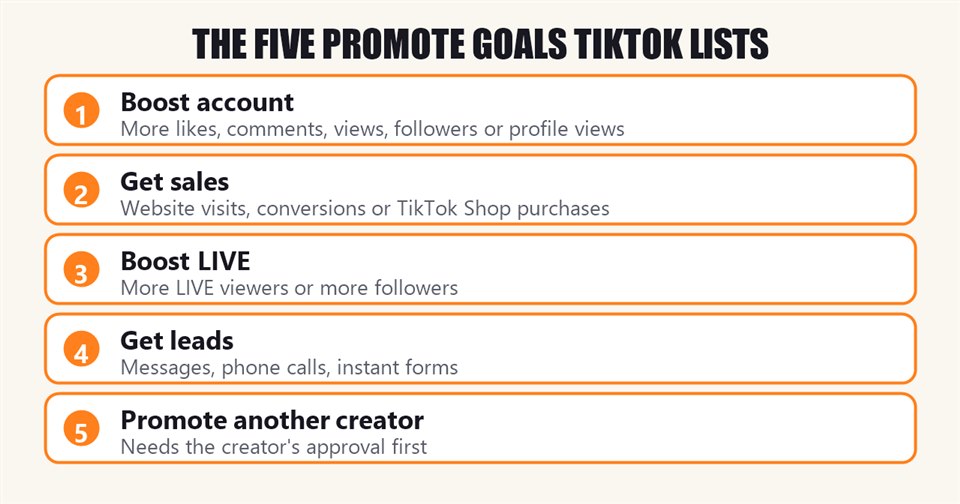
TikTok’s setup page describes five goals. Creators choose one in step 1 of building a TikTok Promote campaign.
- Boost account: “Drive more traffic to your platform.” Per TikTok, this covers more likes and comments, more video views, more followers or more profile views, and elevates content on the For You feed.
- Get sales: to drive purchases and conversions. TikTok says that depending on the setup, creators can optimize for more website visits, more website conversions (which requires Ads Manager) or more product purchases through TikTok Shop.
- Boost LIVE: to grow a LIVE audience, with the choice of more LIVE viewers or more followers. TikTok says a stream can be promoted in real time, with one or more separate videos, or both, and notes that to drive purchases during a LIVE, the “Get sales” goal should be used instead.
- Get leads: to capture leads through more TikTok messages, more phone calls, more leads via instant forms, or other messaging apps. TikTok describes this goal as ideal for service-based businesses.
- Promote another creator’s content: to help another creator amplify their content. TikTok says the creator must approve a request first, and that the same Boost account, Get sales and Boost LIVE goals are available. To send a request, TikTok says to tap the 3-dot icon on their video and select the “Flame” icon, or go to the Promote dashboard and tap Mine, then Other functions, then Requests.
Budget, Timeline and Payment
After the goal, TikTok says creators choose a campaign budget and timeline. They can pick a promotion pack or create a custom plan. Per TikTok, “promotion packs are a great tool” for those just getting started, because they “simplify the process by letting you choose the outcome you want to focus on in a single step.”
Custom promotions remain an option. TikTok says “Custom creation mode” lets creators target an audience by age, gender, location or interest, and set the total budget, duration and audience.
Step 3, per TikTok, is to review and pay: “review your information to make sure your selections are correct. Then, all you need to do is enter your payment method.” The quickest start, TikTok says, is from a video page:
- Click “…” on the video page.
- Click the “Flame” icon.
- Choose a promotion goal (video views, followers, profile views).
- Choose a promotion pack. For custom promotions, set the total budget, duration and audience.
- Check the campaign details and tap “Pay.”
- Select a payment method. TikTok says the payment methods accepted for Promote purchases vary per country.
- Once completed, the order appears on the list, waiting for moderation review.
Where to Open TikTok Promote
TikTok’s setup page lists these entry points:
- From a video: choose the video, tap the 3-dot icon at the bottom right, and select the Flame icon.
- From a profile: tap the 3 dashes at the top right, go to TikTok Studio, and select the Flame icon.
- Before a LIVE: go to the LIVE panel and select the Flame icon. During a LIVE: press the Share icon, then the Flame icon.
- Other entries: the Promote prompt with the Flame icon when it appears in LIVE comments, the “Promote again” button in the order history of the Promote dashboard, the bottom of the Overview tab in TikTok Studio’s Analytics section, or a long press on any video.
TikTok adds that campaigns can also be set up through TikTok Business Suite, TikTok Web, and its partner CapCut. It describes the Promote dashboard as the “hub for all things promotion,” where creators review order history, analyze results and manage promotion requests. TikTok says the FAQ page can also be reached from the “Mine” section of that dashboard.
TikTok Promote Review and Rejections
Per TikTok’s FAQ, each promotion “will be reviewed to ensure that it complies with TikTok’s Community Guidelines and Advertising Policies.”
- Video: all orders are reviewed once they have been paid successfully. TikTok says the review time is typically within 48 hours, with an inbox notification when it is finished.
- LIVE: Promote to LIVE orders become active once paid, but the stream is continuously reviewed automatically.
- If rejected: TikTok says the order ends, the rejection reason is shown on the order detail page (though reasons “might not be disclosed with too many details”), and unused money returns to the Promote balance.
- Appeals: if an order is rejected and the content’s status is “Not delivering” or “Partially delivering,” TikTok says creators can tap “Appeal.” If approved, the content can be promoted again. For a suspended account, TikTok points to the same appeal guidance.
On music, TikTok says: “In order to use Promote, any background music in your content must be commercial music and if it’s not, we will suggest you change it!” It recommends audio from TikTok’s Unlimited Sounds Library to avoid issues. This site’s guide to TikTok music copyright covers that library.
TikTok also says that if the Promote icon turns grey, tapping the icon next to it gives details through a notification, and that if the icon disappears, creators should send feedback through the TikTok Help center with screenshots.
TikTok Promote Payments, Balance and Fees
- Balance: TikTok says to tap Menu on the profile, then TikTok Studio or Business Suite, select Promote, open the “Mine” tab and tap “Balance.” It adds that the Balance entrance may not appear for someone who has not placed a Promote order before.
- Rejected orders: unused money can be used for future orders or withdrawn, except that, per TikTok, users who pay with Apple Pay, Google Pay or coins cannot withdraw from Promote directly.
- Coupons: TikTok says to go to the Promote dashboard, click “Redeem,” choose a promotion pack, apply the coupon and click “Pay.”
- Service fees: for Apple Pay, Google Pay or coins, TikTok says there are other service fees and taxes, including “a service fee charged on in-app purchases by the Apple App Store and any other applicable local charges and taxes.”
- Tax: “A tax will be charged according to the tax policy of your ad’s country when you top up money.”
- Currency: creators can only use the currency of the country in which they registered their TikTok account.
- Card binding: TikTok says it is currently only available in select countries.
- Failed recharge: TikTok lists three things to check: a valid payment method linked to the Google Pay or App Store account, a stable network connection without a VPN, and a valid bank card.
The TikTok Promote Strategies TikTok Lists
TikTok’s strategy page frames TikTok Promote as a four-step cycle, in its words: “Experiment” (run a variety of content and campaign types), “Identify” (use the data in the Promote order details), “Scale” (keep promoting the best-performing combination) and “Grow” (post consistently and repeat). It then lists four strategies. These are TikTok’s recommendations, reproduced as TikTok lists them.
1. Educational, value-packed videos
TikTok says one of the best ways to ensure a Promote campaign performs is to create high-quality content, with a clear title on screen, speaking to the camera and relevant hashtags. Under this strategy it lists promoting introductory videos, reading and responding to comments, and, for specialized content, videos over one minute.
2. Showing your unique, authentic self
TikTok describes a plan for the first two Promote videos: pick one or two aspects of a creator’s life or content as the focus, take a different creative approach in each video, promote both on the day they are posted starting with a low budget, then promote again with a slightly higher budget and watch whether the cost per follower (CPF) decreases.
3. Nailing down a creative format
TikTok says to publish several videos in different formats on the same or consecutive days, promote each with the same budget, goals and targeting, re-promote the one with the best results, and gradually increase the budget.
4. Promoting shorter videos the day you post them
TikTok says simple, short videos can be highly effective promotional tools if they are engaging and have a clear message, and suggests promoting them minutes after posting “to jumpstart a snowball effect from paid views to organic views once the campaign is over.”
TikTok’s setup page adds one more suggestion: to pick a best-performing organic post from the last 30 days, run one small Promote campaign against a single goal, and compare the result to the post’s organic performance before spending more.
What TikTok’s Pages Do Not Say
- Prices: the pages give no prices for promotion packs or a minimum budget.
- Results: apart from the statement that creators “typically see their followers grow faster,” no figures on follower growth, views or cost per result are published.
- Countries: no list of countries where TikTok Promote is available.
- Review details: the “typically within 48 hours” timing is TikTok’s estimate, and rejection reasons “might not be disclosed with too many details.”
For other TikTok creator tools covered from the Creator Academy, see this site’s guides to the TikTok Creator Weekly Report, which links to Promote, and four tools for finding video ideas.
Frequently Asked Questions
What is TikTok Promote?
Per TikTok’s Creator Academy, an in-app ads tool for promoting videos, photo posts and LIVE streams to get more followers, video views or LIVE engagement.
Who can use TikTok Promote?
TikTok says creators who are at least 18, on a TikTok app version above 18.5, with an account registered in a country where Promote is available.
How long does TikTok Promote take to approve a video?
TikTok says review time is typically within 48 hours after payment, with an inbox notification when it is finished.
What happens if a TikTok Promote order is rejected?
Per TikTok, the order ends, the reason is shown on the order detail page, unused money returns to the Promote balance, and creators can appeal if the content’s status is “Not delivering” or “Partially delivering.”
Does TikTok Promote require commercial music?
TikTok says any background music in content promoted with Promote must be commercial music, and it recommends audio from the Unlimited Sounds Library.
Sources: TikTok Creator Academy, Accelerating your growth with Promote; Setting up your Promote campaign; Discovering your perfect Promote strategy; Answering your Promote FAQs; read October 21, 2026.