
TikTok Video Ideas: 4 Tools That Show What to Post (2026)
Running out of TikTok video ideas is a familiar creator problem, and TikTok has built four tools aimed at it. They sit inside TikTok Studio and TikTok’s search, and they answer different questions: what is popular right now, what works for creators like you, what people are searching for that nobody has answered well, and how crowded a topic already is.
This guide to TikTok video ideas explains how each of the four tools works, where to tap to open it and who can use it. Everything below comes from TikTok’s own Creator Academy articles as read on October 6, 2026. TikTok changes these tools often, so treat eligibility details as a snapshot.
The four tools at a glance:
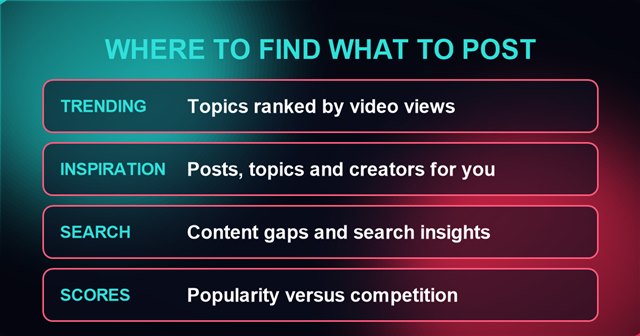
- Trending Topics: a list of up to 50 popular topics ranked by video views, with a trend graph and top example videos.
- Creation Inspiration: posts, topics and creators picked for you, plus a place to save favorites.
- Creator Search Insights: trending search topics, including “content gap” topics people search for but cannot find good answers to.
- Creator Search: popularity and competition scores for any topic you search, plus a breakdown of the kinds of videos already made.
In this article
1. Trending Topics
Trending Topics is the quickest source of TikTok video ideas, and it lives inside the Creation Inspiration area of TikTok Studio. Per Creator Academy, it offers “personalized suggestions for popular topics your viewers might be interested in,” and the list holds up to 50 topics organized by highest video views.
What you can do with it
- Filter the list by region and by niche category, such as comedy, entertainment or sports.
- Tap any topic to see its trend graph, which shows whether the topic’s popularity is rising or falling, plus top-performing example videos.
- Tap “Not Interested” on a topic to see less of it.
How to open it
In the TikTok app, go to your profile, tap the menu, choose TikTok Studio, scroll to Creation Inspiration, tap Trending, select the Topics tab and tap View all to see the top 50 list. In the TikTok Studio app, open Inspiration from the homepage. On the TikTok Studio website, open Inspiration, click Trending, then the Topics tab.
Who can use it: per Creator Academy, the Topics tab is currently only available to creators in the US, Great Britain, Germany, Brazil, Japan, South Korea and Indonesia. TikTok’s own explainer video for the tool is below.
@creatoracademy Looking for inspo? Explore Trending Topics and make your next video pop 💥 #creatoracademy #tiktokfeatures
♬ original sound – TikTok Creator Academy – TikTok Creator Academy
Credit: @creatoracademy/TikTok.
2. Creation Inspiration
Creation Inspiration is the broader hub for TikTok video ideas. Creator Academy describes it as a place to scroll through “top-performing content examples curated just for you.” It has three tabs in the TikTok app and on TikTok Studio web:
- Trending: the current top trending posts, topics and creators, filterable by topic and location.
- Recommended: content picked for you, including posts similar to your own, content your followers viewed and searched for, and similar creators in your niche.
- My Inspiration: a saved list. Tap the save icon on videos and searches you like to keep them in one place.
The TikTok Studio app uses different tab names. According to Creator Academy, they are Hot (topics, posts and creators trending now), Similar (creators and topics like your account), Followers viewed (what your followers are watching) and Outliers. Outliers are videos with views that “significantly exceed a creator’s average level,” which Creator Academy suggests using for ideas that worked for other creators, with your own twist.
To open it in the TikTok app, go to your profile, tap the menu, select TikTok Studio, scroll to Inspiration and tap View all. Then pick the Posts, Topics or Creators tab. Here is TikTok’s own intro video for the feature.
@creatoracademy Creation inspirations in TikTok Studio gives you fresh, fun content ideas💡— ready when you need them! #creatoracademy #creationinspirations #tiktokstudio
♬ original sound – Creator Academy – TikTok Creator Academy
Credit: @creatoracademy/TikTok.
3. Creator Search Insights
Creator Search Insights finds TikTok video ideas by focusing on what people type into TikTok Search. Creator Academy calls it a tool for “detailed insights into trending search topics,” and says it can also help creators in the Creator Rewards Program, because “search value” is one of the key areas in that program’s payout model.
How to use it, step by step
- Tap the search button at the top right of your For You feed, type “Creator Search Insights” and press View.
- Browse suggested topics related to your content, bookmark favorites or jump straight into creating a video from the tool.
- Tap the Trending tab to see what is rising now, or filter by category to narrow it to your niche.
- Tap a topic for AI-powered tips, including suggested video ideas and keywords, then tap the camera icon to start filming.
- Turn on the Content Gap filter to see topics people search for that lack enough results.
- Tap any topic for its popularity trend over the past week, related videos and connected search terms.
The Content Gap filter is the most distinctive part. Creator Academy says a content gap can mean “not enough videos on a topic” or “plenty of videos… but not enough quality ones,” and describes the result as “high demand, low supply.” It also warns creators to keep their niche in mind so they do not confuse their current followers.
Search Analytics and Searches by Followers
Two related features sit alongside it. Search Analytics tracks how your own videos perform in Search, with metrics including search views, search view percentage, search impressions, average click-through rate and average search ranking. Searches by Followers shows your audience’s top questions and trends, and per Creator Academy it is available to users with 1,000 or more followers.
Who can use it: Creator Academy lists dozens of countries, including the United States, Canada, Great Britain, Germany, France, Australia, Japan and Brazil, and says the tool is accessible in English. The topic list runs from a minimum of 100 to a maximum of 500 topics depending on the category, and topics can expire as newer ones replace them. For more on how TikTok Search is changing, see TikTok Is Quietly Turning Into a Search Engine.
4. Creator Search in the TikTok Studio App
Creator Search is a separate tool in the TikTok Studio app that tests TikTok video ideas before you film them. Creator Academy describes it as an analytics tool that gives “a clear, easy-to-follow analysis of any video topic, including popularity, engagement, and reach.”
The scores
- Popularity score: how much a topic is trending, based on relevant video views and how many times users searched for it. A higher score means more people are looking for videos on that topic.
- Competition score: how saturated a topic is, based on how many relevant videos already exist. Per Creator Academy, the lower the number, the better your chance of standing out.
Filters and topic breakdown
You can filter by follower count, video views, region, categories and date posted. The topic breakdown shows the percentage of videos on a topic that fall into each style. Creator Academy’s example is a search for “best Los Angeles restaurants,” which could split into restaurant reviews, travel vlogs, aesthetic videos and recommendations, with examples of each. Scores show up right away, while the breakdown takes time to load because it uses AI to analyze videos from your search.
To use it, tap the magnifying glass at the top right of any page, search for a topic, then explore the scores and the breakdown. Tap the down arrow in the breakdown to see example videos for each type.
A Simple Way to Use Them Together
This part is this site’s suggestion, not TikTok’s. The four tools for TikTok video ideas answer different questions, so they work best in order:
- Start wide with Trending Topics. Filter to your niche and region and note any topic with a rising trend graph.
- Check demand with Creator Search Insights. Look for the same topic in the Trending tab, then switch on Content Gap to see whether people are searching for answers that do not exist yet.
- Check crowding with Creator Search. For any of your TikTok video ideas, a high popularity score with a low competition score is the combination Creator Academy points to for standing out.
- Borrow structure from Creation Inspiration. Open Outliers or Recommended, save two or three videos to My Inspiration and study how they open and what they show.
That sequence turns TikTok video ideas from a vague hunch into a plan. It takes a vague hunch, such as “fall recipes,” and turns it into a specific, searched-for angle. Compare it with how this site’s own TikTok lists are built, such as 5 Viral TikTok Desserts, which start from videos creators actually posted. Once you have an idea, TikTok templates are a fast way to turn it into a video.
What These TikTok Video Ideas Tools Do Not Do
- They do not guarantee views. Good TikTok video ideas still need good execution. Creator Academy frames the tools as help with ideas and discoverability. For how TikTok’s feed itself works, see TikTok Algorithm 2026: Critical Facts vs. Hype.
- They are not available everywhere. Trending Topics covers seven countries, and the other tools have their own country lists.
- AI can be wrong. For Creator Search Insights, TikTok says AI systems “have limitations and are not always precise or accurate” and that it cannot guarantee the accuracy of AI-generated topics.
- Scores are not fully explained. TikTok describes what popularity and competition scores are based on, but does not publish the exact formula.
Official guidance also changes. Eligibility rules, such as the 1,000 follower minimum for Searches by Followers, are described as current by TikTok and can move. Check the Creator Academy article for any tool before you plan around it.
Frequently Asked Questions
Where do I find TikTok video ideas inside TikTok?
The best place to look for TikTok video ideas is TikTok Studio. Open your profile, tap the menu, choose TikTok Studio and scroll to Creation Inspiration or Inspiration. Search-based ideas are in Creator Search Insights, which you open by searching for it in TikTok Search.
What is a content gap on TikTok?
Per Creator Academy, a content gap is a topic people search for that does not have enough results, which makes it a source of TikTok video ideas. That can mean too few videos or plenty of videos that are not good enough.
Do I need a minimum number of followers to use these tools?
Creator Academy names a follower requirement only for Searches by Followers, which needs 1,000 or more followers. The articles read for this guide do not list one for the other tools, but availability depends on country.
Is Trending Topics available outside the US?
Per Creator Academy, it is currently available in the US, Great Britain, Germany, Brazil, Japan, South Korea and Indonesia.
Are the TikTok video ideas these tools suggest AI generated?
Some are. Creator Academy says AI powers the tips in Creator Search Insights and the topic breakdown in Creator Search, and that AI outputs can be inaccurate.
Sources: TikTok Creator Academy articles Trending Topics, Creation Inspiration, Creator Search Insights and Creator Search, read October 6, 2026.