
TikTok Effect House: What TikTok Says the AR Effects App, AI and Rewards Do (2026)
TikTok Effect House is a free desktop app for building the AR effects that TikTok users put on their videos. TikTok’s Creator Academy describes it as “a desktop app that empowers you to design and create Community Effects for TikTok,” and Effect House’s own site says “anyone can use Effect House to create fun, original, and inspiring augmented reality (AR) effects.”
This guide to TikTok Effect House reports what TikTok says on ten pages: the Creator Academy page Effect House: your AR design playground, the Effect House home page, and Effect House guides on the introduction, Effect House AI, effect analytics, sharing, promoting, managing and monetizing effects, plus the Effect Creator Rewards FAQ. TikTok changes its tools and programs, so everything below is a snapshot of TikTok’s own description as read on October 28, 2026. This site adds no advice and no analysis.
What to know:
- What it is: a desktop app for Mac or PC, free to download, for building AR effects and publishing them to TikTok.
- AI: Effect House AI lets creators “create and edit effects by describing what you want in plain language,” using a third-party AI coding agent that the creator connects.
- Money: TikTok’s Effect Creator Rewards pays creators when effects reach a set number of qualified videos. TikTok’s pages give different thresholds, and this guide reports each.
- Not covered: TikTok says AI-generated effects “are not currently eligible” for Effect Creator Rewards, per its FAQ.
In this article
What TikTok Effect House Is
TikTok’s Creator Academy page says: “Effect House is a desktop app that empowers you to design and create Community Effects for TikTok. You can craft, publish, and share dynamic effects that the TikTok community worldwide can use.”
Effect House’s introduction guide calls it “an effect development platform that empowers effect creators to build augmented reality (AR) experiences and effects.” It says creators can make “everything from bunny ears and makeup to floating castles and interactive games,” and that it “doesn’t matter if you’re a design expert or a complete beginner.”
The TikTok Effect House home page is more compact: “Build fun and creative effects for TikTok,” with a “Free desktop app for Mac or PC.” It lists what creators can build: “imaginary worlds, virtual characters, games, filters, sounds, and more.” Creator Academy says to “log in with your TikTok account and download Effect House.”
What Is Inside TikTok Effect House
Creator Academy lists what a creator finds in TikTok Effect House:
- Guides, tutorials, templates: “a treasure trove of helpful guides, tutorials, templates, and community resources.”
- Effect management: “you can submit them for approval and use Effect House’s effect management portal to keep track of your creations.”
- Performance analytics: after publishing, “you can monitor how your effects are performing through analytics” and “even share them with your friends and fam using shareable links.”
- Stay informed: TikTok says its team “will keep you in the loop with email notifications about the status of your effects.”
Creator Academy describes the tools as “powerful AR capabilities, interaction and visual scripting tools, and segmentation tools for things like hair, landscapes, and clothing,” and says creators can “preview your effects in action within the app before submitting them for review.”
The TikTok Effect House home page names three headline features. The Visual Scripting Editor lets creators “create interactive effects faster,” and TikTok says that takes “no coding experience.” The AI Editor will “use AI to create styles and assets for your effects.” And Create With AI will “generate full, interactive effects in just a few clicks.”
On reach, the home page says an effect can be used in “TikTok LIVE videos,” can be discovered “on the For You feed when creators use your effect,” and can be made into “sticker effects that creators can use and share with friends.” Creator Academy adds that designers “will get attribution on their profiles, the camera shooting page, and the effects page.”
TikTok Effect House AI
TikTok Effect House has a conversational AI tool of its own. TikTok’s guide says: “Effect House AI lets you create and edit effects by describing what you want in plain language. It connects Effect House to an AI coding agent that works directly in your open project.”
What the agent can do
Depending on the request, TikTok says the agent can:
- Build scenes by “adding, arranging, and configuring scene objects and components”
- Write scripts by “creating or editing APJS TypeScript scripts for gameplay and interactions”
- Import and generate assets by “searching the Asset Library, generating AI images, or using bundled assets”
- Verify its work by “capturing Preview screenshots and checking script logs before making corrections”
TikTok contrasts it with one-shot generation: “Unlike single-prompt AI generation, Effect House AI is a conversation. You can start with a new or existing project, create an entire effect or make small changes, then continue refining your project by chatting with the agent.” The guide notes that Effect House AI “generates logic as APJS scripts and does not create Visual Scripting graphs.”
What you need
The guide says Effect House AI needs “Effect House with a project open,” “a supported AI coding agent installed on your computer, with your own account for that agent, such as Claude Code, Codex, or Cursor,” and “an internet connection.”
TikTok adds a data notice: “AI coding agents are third-party products. Connecting one shares your project files and prompts with its provider, under that provider’s terms and pricing. You’ll be asked to confirm this the first time you connect.”
An example prompt and the settings
TikTok’s example prompt reads: “Create a mini game where I tap falling stars before they reach the bottom of the screen. Show a score in the top left, and after 30 seconds display a results screen with a Retry button. Use a dreamy night-sky style.” The guide lists follow-up prompts such as “Make the stars larger and add a sparkle effect when I tap them.”
Three settings are described. Use Temporary Session is on by default, so “each time you connect, Effect House AI starts a new conversation. Previous conversations are not saved.” Skip Interactive Dialogs is off by default. Share Preview Screenshots defaults to “Ask Every Time,” with “Allow for This Project” and “Never Allow” as the other choices.
The guide separates this tool from the AI Editor: “AI Editor trains and customizes AI image and video models for use in your effects,” while “Effect House AI is a conversational agent that helps you build and refine effects by creating scenes, scripts, and assets.” TikTok says “these features can be used together.”
Submitting and Managing Effects
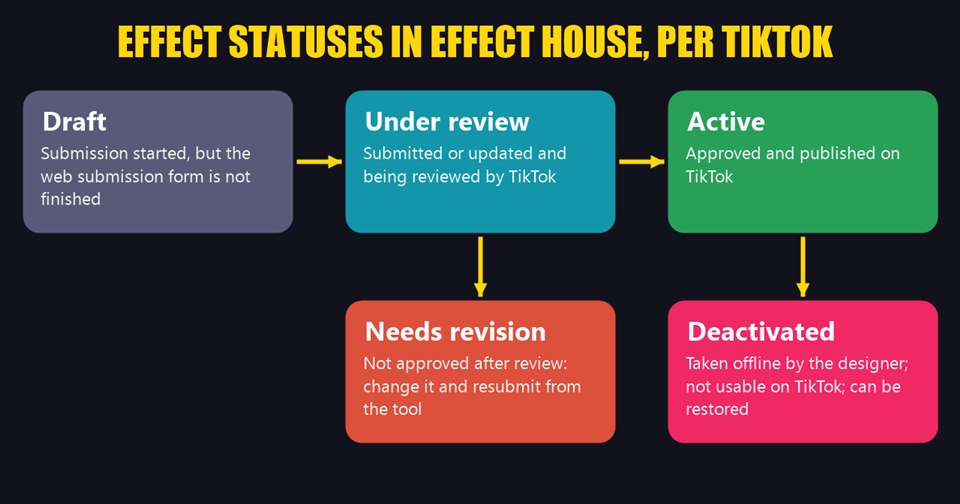
Per TikTok’s Manage Your Effect guide, creators open the Manage effects page from the profile icon at the top of the Effect House homepage, or from the Analytics tab. An effect shows one of five statuses:
- Draft: effects “that have started the submission process” but “have not completed the web submission form.”
- Under review: effects “that have been submitted or updated and are being reviewed by TikTok.”
- Active: effects “that have been approved and are published on TikTok.”
- Needs revision: effects “that are not approved after being reviewed by TikTok,” which can be changed and resubmitted.
- Deactivated: effects “that have been deactivated by the designer,” which “will not be usable on TikTok.”
TikTok says creators can deactivate “effects that you’d like to take offline, but not permanently delete (e.g., seasonal effects),” and restore them at any time, though “please allow 5 minutes to restore a deactivated effect or to deactivate an active effect.” Deactivating also “won’t remove any existing videos on TikTok created with the effect.”
To modify an effect under review, TikTok says to choose Withdraw from review or Delete, then resubmit from the tool. For an effect that needs revision, the detail page shows “the reason it was not approved under Status.”
Where People Find Effects on TikTok
Creator Academy lists six places to find a creator’s effects or anyone else’s:
- The Effects tab on an effect creator’s TikTok profile
- The effects detail page
- An effects QR code
- The effect link above the username on a video, which goes to the effects detail page
- Effect name search
- The Effect Tray, where users view and select effects to use in videos
TikTok Effect House Analytics
TikTok’s Effect Analytics guide says creators can track an active effect “on the Analytics dashboard,” reached by clicking the Analytics tab in Effect House. The dashboard “is divided into three sections: Overview, Audience, and Manage effects,” and “all data in Analytics are displayed in your local time and will update every 24 hours.”
The Overview section covers five measures, defined by TikTok as follows:
- Views: “the number of views of videos on TikTok that used the effect.”
- Posts: “the number of videos on TikTok that used the effect.”
- Opens: “the number of times the effect has been opened (i.e. clicked on) in the effects tray.”
- Likes: “the number of times that videos with the effect have been liked on TikTok.”
- Shares: “the number of times that videos with the effect have been shared on TikTok.”
The Audience section shows “the regions where people are using your effects in videos, and the regions where people are watching videos featuring your effects.” Each effect also has a details page with a rank “among all Community Effects” and a Popular videos section showing “the number of creators who have used your effect, which creator is contributing the most views, and the top videos using your effects.”
TikTok notes that “data updates every 24 hours and may differ from data in the TikTok app,” and the management guide says analytics in Effect House “are global” while those in the TikTok app “are for your region only.”
Sharing and Promoting an Effect
TikTok’s Promote Your Effect guide makes a claim about video: “Your effect is up to 10 times more likely to be used by the TikTok community if you make a video promoting it.” It says to post the video “ideally within the first 24 hours of your effect being published, but definitely within the first few days.”
The guide lists what a promotional video can do: “announce and publicize your effect,” “demonstrate to viewers how your effect can be used,” “prompt viewers to create their own videos using your effect” and “start a trend.” It adds that “while you may choose to show your face in the video, it’s not required!”
One mechanic matters to how the video shows up. TikTok says “the first TikTok video you post with your effect will get displayed on the effect tab of your profile page,” and that creators should “initiate the video creation on TikTok by clicking your published effect to use it, rather than uploading a screen recording from your phone camera roll.”
Outside TikTok, the Share Your Effect guide says the Manage page can produce a QR code and link for any active effect: “users who scan the effect QR code or click on the effect URL will land on the effect’s detail page on TikTok.” Other ideas it lists are adding the effect URL to a profile, partnering with creators “whose content aligns with the category or features of your effect,” and running a hashtag challenge.
TikTok Effect House Rewards and Payouts
TikTok Effect House has several ways to earn. TikTok’s Monetize Your Effects guide says “a single effect can potentially qualify for multiple Effect House programs and activities at the same time.” The main program in TikTok Effect House is Effect Creator Rewards, which TikTok describes as a program “that offers creators the opportunity to collect rewards for creating highly engaging TikTok effects on the Effect House desktop app.”
What the Monetize guide says
- Joining: “eligible creators simply need to have the Gold Badge, which can be unlocked with just a handful of published effects.”
- Counting: creators collect rewards “based on total qualified video publishes, or unique videos from eligible regions that used their effect within the first 90 days.”
- Threshold: “when an effect reaches 100,000 qualified public videos, a creator will start collecting rewards.”
- Reach: “Effect Creator Rewards is currently open to 53 regions.”
What the Effect Creator Rewards FAQ says
The separate FAQ describes a newer structure. It says “creators collect rewards based on total qualified video publishes, or unique public videos from eligible regions that used their effect within the first 30 days,” and gives per-category thresholds:
- Game and Randomizer effects: 5,000 unique video publishes
- Makeup effects: 100,000 unique video publishes
- Green screen effects: 100,000 unique video publishes
- All other categories: 5,000 unique video publishes
- AI-generated effects: “not currently eligible”
The FAQ explains the difference: “All effects published before July 3, 2024 at 0:00 AM UTC, when the updated Effect Creator Rewards officially launched, will continue to follow the original payout structure and requirements.” Under that original structure, “for every effect that reaches 100,000 qualified video publishes within its first 90 days, creators will collect cash payouts based on RPM.”
Eligibility and limits in the FAQ
- Age and badge: creators must be “at least 18 years of age” and a “Gold, Platinum, or Diamond Badge creator, with at least 5 effects published and 3 effects used in 1,000 qualified videos each.”
- Setup: creators must “have completed tax and payment method setup.”
- Location: the FAQ lists a set of countries, “subject to change,” and says eligibility “will be based on your location when you created your TikTok account.”
- Effect type: “only Community Effects created using the Effect House desktop tool are eligible to collect rewards,” not effects made inside the TikTok app.
- Caps: “the maximum payout a single effect can collect is $14,000 USD. The maximum payout a single creator can collect per month is $50,000 USD.”
- Payment timing: “rewards over $10 USD will be paid out on the 15th of the following month.” Smaller amounts “will continue to accrue until it reaches $10 USD or after 6 months, whichever comes first.”
- What counts: a qualified video publish is “a public TikTok video that uses the effect.” Two videos with the same effect from one user on the same day count as one.
TikTok defines RPM as “Revenue Per Mille or reward amount per 1,000 unique public video publishes,” and says the amount “may vary and fluctuate over time based on several factors, including the region where the video was published.” The FAQ says no one needs to be a top creator: “creators don’t need to have a lot of TikTok followers or generate millions of views.”
Challenges, Brands and Community in TikTok Effect House
The Monetize guide lists two more programs. Challenges “offer beginner and experienced TikTok effect creators a chance to showcase their creativity, get prizes, and connect with the Effect House community.” TikTok says prizes “may include: cash prizes, exclusive badges or profile frames, special placements within TikTok’s Creative Effects tray, or TikTok or Effect House swag.”
Working with brands covers Branded Effects. TikTok says that at its Open House developer conference in late 2023 it “announced that creators can produce Branded Effects for advertisers who purchase one from TikTok for Business,” and that brands “can now partner with any effect creator or agency.” The guide adds that “later this year, creators will be able to join our Marketplace to allow brands easily find them,” without saying which year.
For community, TikTok Effect House has a Discord, which Creator Academy says has “version releases, challenges, office hours, feature highlights, and more,” plus events such as “hackathons, challenges, live demos, meetups, and more.” The home page says creators can “collect cash rewards and badges as you grow your audience.”
TikTok Effect House is one of several creator tools TikTok documents on its Creator Academy, and it is the one aimed at people who build effects rather than videos.
For other TikTok creator tools in the company’s own words, see Creator Search Insights, TikTok Symphony, TikTok Studio, the TikTok Creator Assistant and TikTok Promote. For how videos reach viewers, see how the For You feed works.
What TikTok’s Pages Do Not Say
- Which reward structure applies today: the Monetize guide gives 90 days and 100,000 videos, while the FAQ gives 30 days and thresholds of 5,000 or 100,000 depending on category. The FAQ explains the difference by effect publish date, but neither page says which one the Monetize guide describes.
- Region counts: the Monetize guide says 53 regions, and the FAQ lists its countries “subject to change.” The pages do not say whether the two lists match.
- Dates: the TikTok Effect House pages read for this guide carry no publication dates. The FAQ mentions events in 2024, and the Monetize guide’s “later this year” is not tied to a year.
- Payout amounts: TikTok gives caps and the RPM definition but no RPM figure.
- TikTok Effect House AI availability: the guide does not say who has access or when it launched.
Frequently Asked Questions
What is TikTok Effect House?
TikTok describes TikTok Effect House as a free desktop app for Mac or PC that lets people design, publish and share AR effects for TikTok, from face filters to interactive games.
Is TikTok Effect House free?
The Effect House home page lists it as a “Free desktop app for Mac or PC.” Effect House AI needs a third-party coding agent that creators connect with their own account, under that provider’s terms and pricing.
Can you make TikTok effects with AI in TikTok Effect House?
TikTok says Effect House has an AI Editor for styles and assets, a Create With AI feature, and Effect House AI, a conversational tool that builds scenes, scripts and assets using a connected coding agent.
How do you get paid for TikTok effects made in TikTok Effect House?
TikTok’s Effect Creator Rewards program pays eligible creators once an effect reaches a set number of qualified public videos. Challenges and Branded Effects are separate routes, per TikTok’s Monetize guide.
Are AI-generated effects eligible for Effect Creator Rewards?
TikTok’s FAQ says AI-generated effects “are not currently eligible for Effect Creator Rewards.”
How long does an effect take to be approved in TikTok Effect House?
TikTok’s pages on TikTok Effect House do not give a review time. They say effects are shown as “Under review” while TikTok reviews them, and that creators get email notifications about their status.
Sources: TikTok Creator Academy: Effect House, Effect House, and the Effect House guides on the introduction, Effect House AI, analytics, sharing, promoting, managing and monetizing effects, and the Effect Creator Rewards FAQ (all read October 28, 2026).