TikTok Creator Tips: What Creator Academy Says About 8 Steps for New Creators (2026)
TikTok’s Creator Academy has a short list of TikTok creator tips for people who watch videos and wonder whether they could make them. The first page is called “8 tips for becoming a successful TikTok creator.” A second page, Kickstarting your TikTok journey with these content ideas, helps with the step before that: picking a topic and a format.
This article sets out the TikTok creator tips from both pages in order, quoting where the wording matters and noting what the pages do not say. All of it is TikTok’s own guidance, reported as such, and none of it is this site’s advice.
What to know:
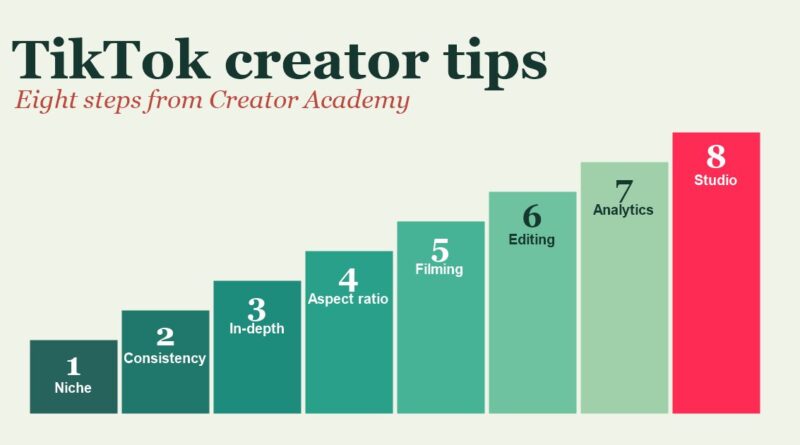
- The TikTok creator tips: find a niche, focus on consistency over volume, make in-depth content, pick the right aspect ratio, mind the filming details, edit well, read your analytics and use TikTok Studio.
- The first 3 seconds: the page says to “hook your viewers within the first 3 seconds.”
- Posting schedule: TikTok says “your exact posting cadence is totally up to you.”
- Long videos: TikTok Studio desktop supports uploads “up to 60 minutes long in 720p resolution or higher, up to a size of 10 GB.”
- Niches: the second page lists ten example categories and three formats.
In this article
What the Creator Academy TikTok Creator Tips Are
Creator Academy is TikTok’s own library of guides for people who make videos. The first page opens with a pitch: “If all that scrolling has you thinking, ‘Could I do that?’ The answer is YES! There’s room for everyone to grow and thrive on TikTok.” It promises tips to “get started and crush your content from the very first post.”
The page carries an official video from the @creatoracademy account, which is embedded below. Its caption reads: “Could you be the next TikTok success story? Here’s our top 8 tips!” It was posted on November 21, 2024.
Watch on TikTok: @creatoracademy
The Eight TikTok Creator Tips
1. Find your niche
The page says “Success on TikTok is all about authenticity” and tells creators to choose a topic “that speaks to you.” Its reasoning is practical: “You’re the one who has to create these videos over and over again, so make sure it’s something you truly care about, not just what you think people want to see.” It gives two examples: a carpenter showing off skills, or a musician teaching a lesson or sharing original songs.
TikTok adds that creators should “avoid ‘general’ interest areas,” because “the more you focus, the more likely you are to find a community of enthusiastic and passionate fans.” It also suggests writing “a mission statement” to check each upload against.
2. Consistency, but quality over quantity
According to the page, “Maintaining a steady stream of high-quality content is always better than rushing to push out daily updates.” It adds that “your exact posting cadence is totally up to you,” and suggests building “a content calendar.” Consistency, in its words, applies to “formatting, production, and publishing,” because it helps the audience “know what to expect.” The page also says creators should still “try out different styles and formats.”
3. Informative, in-depth content
To “stand out in the For You feed,” the page says content “should have a unique perspective and make people feel or learn something.” It lists six formats: solve a problem, bust a myth, share a hack, elevate the everyday, respond to a comment and teach step by step. For the last one, it suggests “using text throughout to provide context and clarity.”
4. The right aspect ratio
TikTok says it “isn’t only for vertical videos.” With Full Screen mode, “uploaded horizontal videos will automatically show a ‘view full screen’ button.” The page says there is no need for black margins, but the video must be “truly landscape (no text overlaid in the margins).” Full screen also “optimizes your viewers’ experience on the TikTok TV app.”
5. The details when filming
The page names three parts of a TikTok video: “video creation, the sound, and the story.” Its checklist for the filming details is short: keep the camera stable “with a fixed position or stabilizer,” make sure there is “great lighting in every shot,” and add “different angles and shots or multiple cameras.” For more depth, see this site’s guides to TikTok filming tips and TikTok audio tips.
6. Editing skills
The editing advice is about speed and the opening seconds: “fast-paced storytelling, quick cuts, captivating shots, great music, and a fun visual flair.” The page says “It’s important to hook your viewers within the first 3 seconds,” and offers three ways to do it: introduce a question you will answer, set a timer or include the time in the title, or tease “the end result” before showing the process. It also advises to “snip out the boring parts to help increase your watch time.” For an editing tool, see CapCut for TikTok.
7. Analytics
TikTok points creators to Analytics for “insights about your audience” and “creative inspiration for future videos.” It suggests starting with watch time, found under the Content tab, and looking at “the drop-off point” to learn “where are you losing people and why.” Longer average watch time, it says, shows that a video is “clearly resonating with your audience.”
8. TikTok Studio
The last tip is TikTok Studio, which the page calls “your one-stop shop for content creation and management.” It lists organizing, editing and analyzing videos, plus “scheduling posts and bulk upload.” This site covers the tool in its guide to TikTok Studio.
Finding a Niche: TikTok Creator Tips on Ten Categories
The second Creator Academy page adds TikTok creator tips for an earlier step in the process. It says to “make a list of all the things you’re passionate about” and then use the list “to explore intriguing hashtags and topics.” Once a creator finds a community, the page says, they can post within that niche “to connect with like-minded individuals and collaborate with creators.”
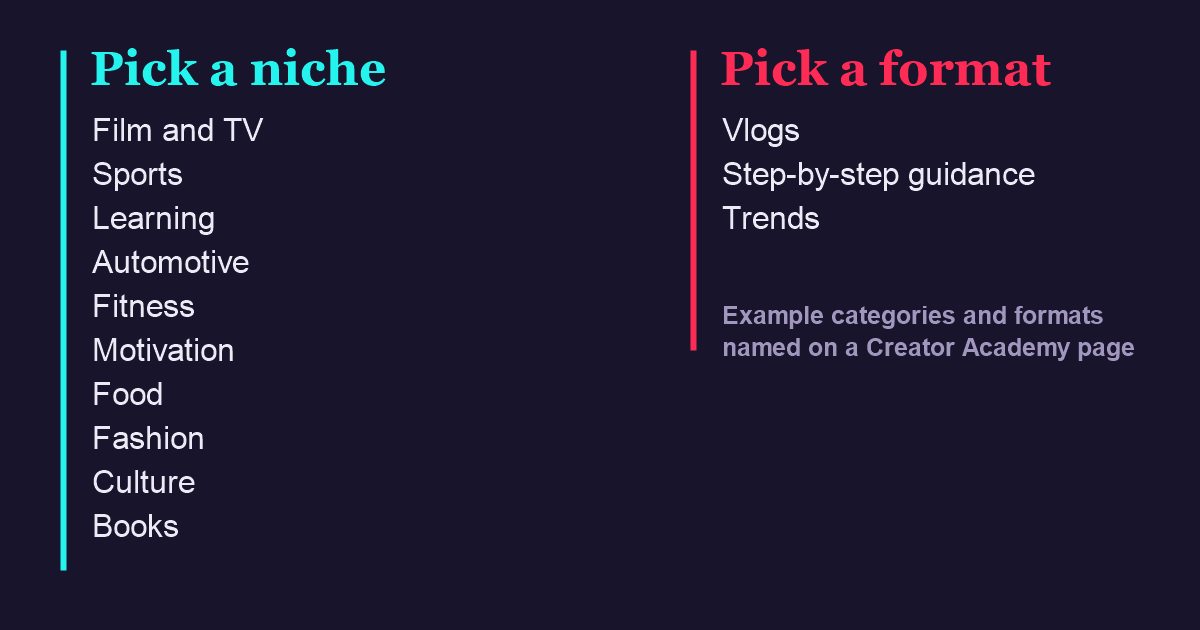
The page names ten example categories: film and TV, sports, learning, automotive, fitness, motivation, food, fashion, culture and books. Each gets a short pitch. For film and TV, it says to “spill all your thoughts on TikTok.” For sports it suggests “step-by-step tutorials on a specific skill, record commentary on crazy plays of the week, or show off your athleticism with challenges.” For books, it points to #BookTok as “a continuously growing community.” Film and TV creators can read more in this site’s guide to TikTok fan content.
For several categories the page links to a creator spotlight, naming @andrewsvisual for film and TV, @insaneshayne for sports, @tempahtime for personal finance, @sabrina.zohar for motivation, @jeremyjacobowitz for food, @hina for fashion and @tilscience for culture. These names come from TikTok’s own page, which presents them as examples.
Watch on TikTok: @creatoracademy
That page’s official video, posted on April 1, 2025, is embedded above. Its caption reads: “Want to kickstart your content creation journey but not sure where to start? Watch this to spark some inspiration!”
Choosing a Format: More TikTok Creator Tips
After the niche, the second page moves to format. It lists three styles to consider. Vlogs are “like your personal reality show, sharing slices of your life,” such as a morning routine or behind-the-scenes of a creation. Step-by-step guidance keeps an audience engaged, with on-screen text to guide viewers; the page adds a “pro tip” to tease the finished result at the beginning “so viewers want to stick around and learn.” Trends keep content fresh when a creator puts “your personal twist” on them and mixes them into the schedule.
The page closes the TikTok creator tips with a point that matches the first one: “the best way to find inspiration is to simply scroll on TikTok and learn from your favorite creators.” It also links to creator success stories and to a next step, building a community.
The TikTok Studio Details Behind the TikTok Creator Tips
The only hard numbers in the tips page sit in the TikTok Studio entry. It says that with TikTok Studio desktop, creators “can publish longer videos without any limitations on your creativity,” whether the video is “landscape or vertical.” It states the limit as “up to 60 minutes long in 720p resolution or higher, up to a size of 10 GB.” Those are TikTok’s figures from the page, and the limits for other upload routes may differ.
What the TikTok Creator Tips Do Not Say
- How often to post. The page says only that cadence is “totally up to you.”
- How many views or followers a new creator can expect.
- Any guarantee of growth. The pages describe habits, not results.
- How the For You feed ranks content. The pages mention standing out there but do not explain the ranking.
- When the pages were last updated. Neither page shows a date, and the two official videos were posted in November 2024 and April 2025.
Other Creator Academy guides on this site include TikTok filming tips, TikTok audio tips, TikTok Studio, Creator Search Insights and business vs personal accounts.
Frequently Asked Questions
What are the eight TikTok creator tips?
Find your niche, focus on consistency and quality over quantity, make informative and in-depth content, choose the right aspect ratio, pay attention to filming details, improve your editing, dig into analytics and use TikTok Studio.
How do the TikTok creator tips handle posting frequency?
The TikTok creator tips say “your exact posting cadence is totally up to you.” They recommend a steady stream of high-quality content over rushed daily updates.
Do the TikTok creator tips cover horizontal videos?
Yes. The TikTok creator tips say uploaded horizontal videos show a “view full screen” button, as long as the video is truly landscape with no text in the margins.
How long can a video be in the TikTok creator tips?
TikTok’s page says up to 60 minutes, at 720p or higher, up to 10 GB, when publishing with TikTok Studio desktop.
Sources: TikTok Creator Academy: 8 tips for becoming a successful TikTok creator and TikTok Creator Academy: Kickstarting your TikTok journey with these content ideas, read in November 2026. TikTok and the names mentioned belong to their owners; this site is independent and not affiliated with TikTok.