
CapCut for TikTok: What Creator Academy Says About Editing, Effects and Captions (2026)
CapCut for TikTok is a pairing the TikTok Creator Academy promotes on three separate pages. TikTok calls CapCut “a third-party partner to TikTok that helps you edit like a pro directly from your phone,” and says it makes content creation “more accessible and engaging for everyone with straightforward video editing functions, in-app fonts and effects, and advanced features such as animation, slow motion, text-to-speech, and so much more.”
This guide to CapCut for TikTok reports what TikTok says on three pages: Creating well-crafted content with CapCut, Creating more engaging content with these CapCut tricks and Enhancing your videos with CapCut special effects. Every claim is credited to TikTok. CapCut is a separate app, and this guide does not review it.
CapCut for TikTok at a glance:
In this article
- Editing elements: TikTok says “the best-performing videos include at least two” of four elements (content aesthetic, theme, music or audio, editing complexity), “but the more, the better.”
- Hook: TikTok says “if you don’t capture your audience’s heart in the first 5 seconds, they’ll swipe right by.”
- Subtitles: TikTok says “over 30% of users actually watch videos on mute,” so CapCut’s caption tools matter.
- Link to TikTok: audio bookmarked on TikTok shows up in CapCut once the account is connected, unless it fails the copyright check.
What CapCut for TikTok Means
The three pages treat CapCut for TikTok as the editing app that fits TikTok’s own tools. The first page is a beginner overview. The second is built around hooks, subtitles and endings for longer videos. The third is a catalog of effects and text features. The sections below follow that order, so CapCut for TikTok reads the way TikTok lays it out.
Why TikTok Points Creators to CapCut
The beginner page opens with a claim about the platform: “As TikTok’s global community grows, content on the app is becoming more creative, complex, and exciting. This means that in order to stand out, you’ve got to create well crafted, high quality content.” TikTok says quality work includes “great editing” and adds: “That’s where CapCut comes in.”
TikTok says CapCut “offers essential editing features, creative effects, filters, stickers and fonts, and a wide range of video templates to empower users to easily create incredible content regardless of video editing experience or expertise.”
The Elements of Great Editing
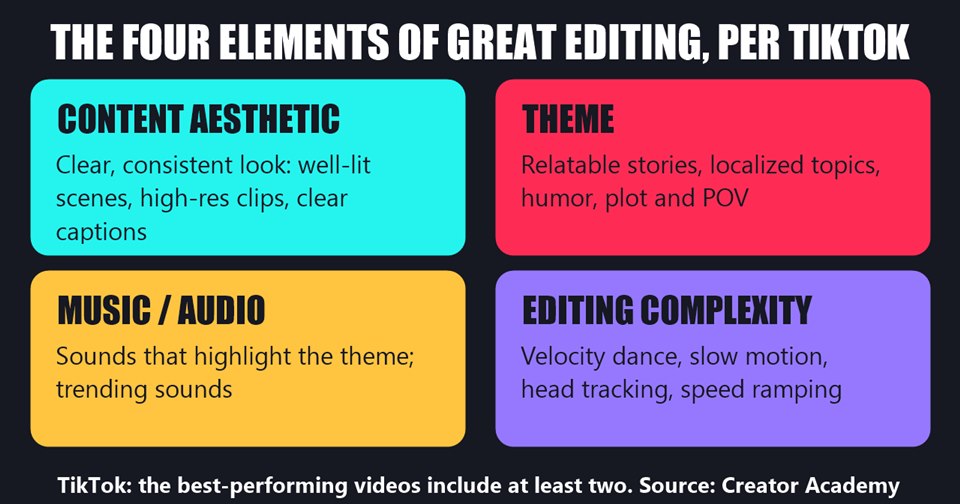
Before the app steps for CapCut for TikTok, the beginner page lists four components. TikTok says “we’ve found that the best-performing videos include at least two, but the more, the better!” Its descriptions:
- Content aesthetic: “Maintain a clear and consistent aesthetic with well-lit scenes, high-resolution clips, and clear captions throughout.”
- Theme: “Use relatable stories, localized topics, humor, plot, and POV to add depth to your content.”
- Music/Audio: “Use sounds that highlight your content’s theme. Take advantage of trending sounds and audio as often as possible.”
- Editing complexity: “Add visual flair to your content with editing choices like velocity dance, slow motion, head tracking, and speed ramping.”
CapCut for TikTok: The Steps in the App
The beginner page gives a step-by-step path for using CapCut for TikTok. TikTok’s steps, in its words:
- Download the CapCut app, which TikTok says is “available in PC and mobile versions.”
- Open CapCut and tap New Project (+).
- Select video clips or photos by “clicking the circle at the top right of each clip,” then tap “add.”
- Click “add audio” to pick sounds or music, and use “Copyright Check” “to ensure it can be used on TikTok.”
- On the editor page, find “the editing tracks (for video, audio, text, stickers, and effects), the timeline, cover templates, and sounds.”
- Edit audio. TikTok says CapCut’s sound tools “range from basic functions like text-to-speech and video noise reduction to more advanced functions like vocal beautification and voice isolation.”
- Edit clips. TikTok lists “video effects, ultra-clear image quality, AI captions, and retouch beauty” as basics and “chroma cutout, smart cutout, and auto reframe” as more advanced.
- Add a video cover, “the first aspect of the video that people see while scrolling through CapCut.” TikTok says to make it “visually appealing with bright colors and large text.”
- Tap export at the top right of the editor page to post the video “directly to TikTok” without a watermark.
CapCut Templates and the TikTok Link
For CapCut for TikTok users who see a trend and want their own version, TikTok says “make it happen in minutes with CapCut templates.” The process it describes: “All you have to do is select the trend or template you want in the app, add in your own clips and text, and let CapCut do the work for you!” This site covers TikTok’s own template tool in TikTok Templates: How to Use Them and Make Your Own.
The beginner page also describes connecting the two apps: “Once connected, all you’ve got to do is bookmark the audio or music on TikTok, head to your CapCut account, and you’ll find them in your audio section waiting for you to use! The only reason they wouldn’t appear is if they did not pass the copyright check.”
Tip 1: Craft the Hook
The second page of CapCut for TikTok advice is about longer videos. TikTok says “high-quality long form videos are having a moment on TikTok” and that they “can help you earn rewards through the Creator Rewards Program.” It organizes its CapCut for TikTok advice into three parts, starting with the first five seconds.
Clear and vibrant opening
TikTok says “nothing stops the scroll like a captivating opening visual.” For the hook, it points to CapCut filters that make colors “softer, brighter, or more vintage,” and to “entrance animation,” which “makes any logo appear slowly and enhances the visual effect instantly.” TikTok also says to tell viewers the video’s main theme “within 5 seconds” using CapCut’s AI cover or text templates, and suggests “intriguing questions, sneak peeks, or timers in your title and cover.”
Music and voice
TikTok says CapCut’s sound effects library “offers thousands of sounds that can help emphasize your theme.” For voice, it points to a one-click voice enhance feature “to eliminate background noise,” and to text-to-speech, which reads entered text aloud “in whatever style you choose.” Audio recording itself is covered in this site’s TikTok audio tips guide.
Tip 2: Keep Viewers Watching
The second of the CapCut for TikTok tips is about avoiding “unnecessary audience churn.” TikTok’s advice has two parts.
Subtitles. TikTok asks: “Did you know that over 30% of users actually watch videos on mute? That’s why subtitles are essential and easier than ever to add with CapCut’s subtitle features.” It lists three:
- Captions recognition: “Automatically turn voiceovers into subtitles with super accurate AI recognition.”
- Subtitles templates: “Make your subtitles change color, glow, and offer various effects.”
- Auto highlight: “Automatically change the color of important words to add memory points and emphasize key information.”
Transitions and effects. TikTok says CapCut can make transitions “smooth and seamless,” and that “Combination Animation allows for more natural transitions, ensuring your viewers won’t feel any jarring jumps.” For single-shot videos, TikTok says “video and character effects can help you enhance emotional expression.”
Tip 3: Leave a Lasting Impression
The third of the CapCut for TikTok tips covers endings. TikTok lists three:
- Summarize and highlight. CapCut’s text templates can help, with “bold colors, unique fonts, and eye-catching effects” to make a summary “more visually impactful.”
- End with style. TikTok says “the sound fade-out feature gradually reduces the sound volume, allowing for a more natural and comfortable ending to your content.”
- Include a playful but sincere call-to-action. TikTok’s sample line: “Hey, did you like my video? Don’t forget to like and follow! Your little support is my biggest motivation!” It says this “makes your audience feel more connected to you and might inspire them to come back for more.”
CapCut Visual Effects TikTok Lists
The third page of CapCut for TikTok guidance, on special effects, opens by saying CapCut “has all of the effects you need to make your videos pop!” TikTok lists seven visual features, each with a use case:
- Body effects: “dynamic lines or halos to enhance movement or highlight specific points in your video.” TikTok suggests dance videos or the punch line of a storytime.
- Dynamic overlay: “overlaying video on video,” for example to show two clips at once in a movie review post.
- Filter effects: color and texture filters, such as color filters in a recipe video “to make your food look extra tasty.”
- Color adjustment: an AI feature that “automatically” adjusts the color levels of a whole video.
- Transition effects: smooth transitions with the Combination Animation feature.
- Speed ramping: changing “the duration of multiple clips to add depth to your storytelling,” such as slowing a trick shot or speeding up a kitchen clean.
- Sound effects: “thousands of sounds in CapCut’s extensive sound effects library.”
CapCut Text Features TikTok Lists
The same page of CapCut for TikTok features says text “helps keep viewers’ attention and makes your content more accessible.” Its four text tools:
- Auto captions: turns audio into subtitles, with different text styles and fonts, and can “switch your subtitles into a different language to increase a video’s accessibility.”
- Filler words: removes words like “um,” “like,” and “ya know” in one click, in CapCut’s desktop video editor, “helping you sound more confident and trustworthy.”
- AI writer: helps “come up with personalized content, and generate video scripts.”
- Timeline maker: adds “dynamic movement and text templates” and timelines “to help viewers follow along with the progression of events in your video.”
Other guides on this site that draw on TikTok’s Creator Academy, alongside this guide to CapCut for TikTok:
- TikTok Templates: How to Use Them and Make Your Own
- TikTok Audio Tips: Mics, Soundproofing and the Clean Track Method
- TikTok Filming Tips: Lighting, Framing and Camera Moves
- TikTok Music Copyright: Why Videos Get Muted
- TikTok Studio: What the App, Web and In-App Versions Offer
What TikTok’s Pages Do Not Say
- The pages on CapCut for TikTok do not give CapCut’s price or say which features are free, or which are paid.
- TikTok does not publish the data behind “the best-performing videos include at least two” of the four elements, or define “best-performing.”
- TikTok says CapCut is a “third-party partner.” The pages do not describe the terms of the partnership.
- The pages say the post-to-TikTok export has no watermark but do not say whether other settings apply.
Frequently Asked Questions
What does TikTok say CapCut for TikTok users is?
TikTok calls CapCut “a third-party partner to TikTok that helps you edit like a pro directly from your phone,” with versions for PC and mobile.
Can CapCut for TikTok post straight to the app?
TikTok’s beginner page says to “send and post your video directly to TikTok without a watermark,” and to tap export at the top right of the editor page.
How do I get TikTok audio in CapCut, per TikTok?
TikTok says to connect the accounts, bookmark the audio or music on TikTok, and look in the audio section of CapCut. Audio that did not pass the copyright check will not appear.
Why does TikTok say subtitles matter?
TikTok says “over 30% of users actually watch videos on mute,” and calls subtitles “essential.”
Which CapCut for TikTok features cover text?
The text tools are auto captions, filler word removal, an AI writer and a timeline maker.
Sources: TikTok Creator Academy: Creating well-crafted content with CapCut, Creating more engaging content with these CapCut tricks and Enhancing your videos with CapCut special effects (all read October 30, 2026).