TikTok Flip Story: What Creator Academy Says About Stories, Bulletin Boards and Creator Inbox (2026)
The TikTok Flip Story is a Stories feature that lets a creator post two photos as one story, with the second photo hidden until a viewer flips the first. TikTok’s Creator Academy describes it in a short page, and three other Academy pages cover the tools that sit around it: regular Stories, the bulletin board and Creator Inbox. TikTok opens its TikTok Flip Story page with a line about purpose: “Connection is the key to building your community on TikTok.”
This guide to the TikTok Flip Story reports four pages: Flip Story: TikTok’s interactive stories feature, Capturing your spontaneous moments with TikTok Stories, Engaging your followers with the bulletin board feature and Staying on top of your messages with Creator Inbox. Everything below is what TikTok says on those pages, quoted or closely paraphrased, and nothing is tested or rated here.
TikTok Flip Story at a glance:
In this article
- What it is: TikTok calls it “a photo-only feature that lets you publish two different photos under one story post.”
- How viewers see it: they press “Hold to Flip” on the first side to reveal the second.
- Where it lives: TikTok says Flip Story is “exclusively on TikTok Stories.”
- Related tools: regular Stories last 24 hours, the bulletin board allows up to 20 bulletins a day, and Creator Inbox is for creators with 10k+ followers.
What TikTok Says a Flip Story Is
TikTok describes the TikTok Flip Story as “an awesome feature that allows you to share special moments with your followers in a dynamic and engaging way that will leave them wanting more!” The same page calls it “exclusively on TikTok Stories,” which means it belongs to the Stories format and not to regular video posts.
The page frames the feature with the heading “One story, two moments.” In TikTok’s words, “Flip Story is a photo-only feature that lets you publish two different photos under one story post.” It gives three example uses for the two photos: “before-and-after shots, comparing two events, or simply showcasing different angles.” TikTok says this “adds a new layer of creativity to your storytelling on TikTok.”
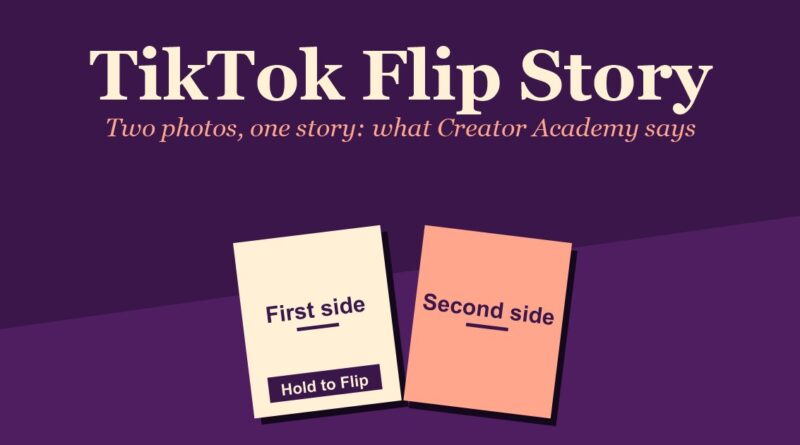
Every TikTok Flip Story has two sides, and the page defines them in a short list:
- First Side: “The first photo shown to viewers.”
- Second Side: “Viewers can unlock the second side by flipping the first side!”
How to Make a TikTok Flip Story
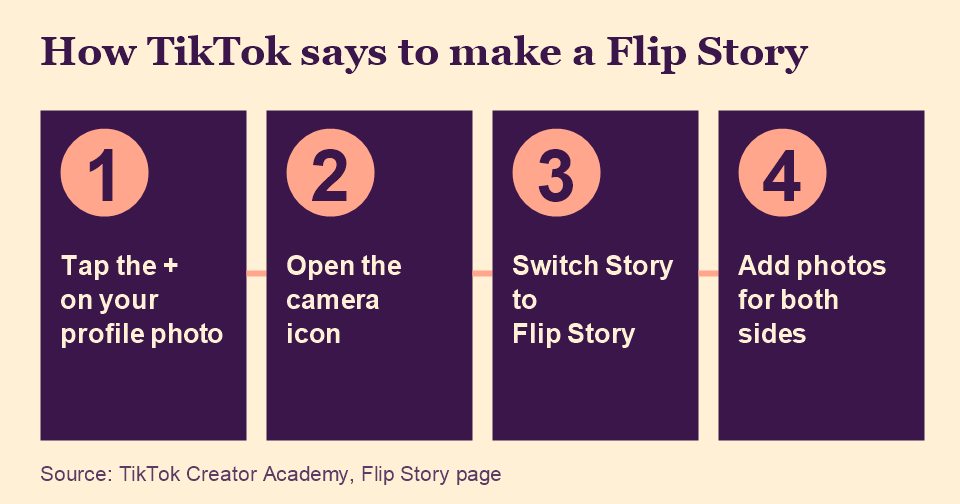
TikTok calls the TikTok Flip Story “super simple and fun to use” and gives the creation path in one paragraph. The steps below follow its wording:
- Go to your profile or your inbox and tap the “+” button on your profile photo.
- Click the camera icon to open the story creation page.
- At the bottom of that page, toggle from “Story” to “Flip Story.”
- Add content for both sides. TikTok says you can “Snap photos directly in-app or upload images from your device” for the First Side and the Second Side.
The TikTok Flip Story page lists no other settings, such as text, stickers or music. A different Creator Academy page, covered below, says regular Stories can carry music, stickers and effects, but the TikTok Flip Story page does not say whether a Flip Story can.
How Viewers Open a Flip Story
On the viewing side, TikTok says to “Press the ‘Hold to Flip’ button on the first side of a Flip Story to reveal the hidden content.” That is the full viewer instruction on the TikTok Flip Story page, and it ties back to TikTok’s description of the second photo as hidden content that viewers unlock.
For creators, TikTok says you can “Track your viewers’ interactions with your Flip Story in your story viewers list.” The page does not describe what that list shows beyond that sentence, such as whether it records who flipped a story or how many times.
Why TikTok Says to Use It
TikTok gives three reasons to use the TikTok Flip Story, each under its own heading on the page.
Strengthen community engagement
TikTok says the platform “thrives on community interaction” and that a TikTok Flip Story “brings new opportunities for your content to spark trends and encourage new conversations among your viewers.” It adds that “An interactive story post can potentially boost engagement and raise your content’s visibility through increased watch time.” The word TikTok uses is “potentially,” and the page gives no figures.
Build up hype for your content
TikTok says the TikTok Flip Story helps creators “leverage TikTok stories as a way to share exciting content like surprise drops, behind-the-scenes, and easter eggs for your brand.” Its advice is to “Come up with creative, fresh ideas to draw in your audience.”
Showcase your creative identity
The third reason is about voice. TikTok says the feature lets you “weave a narrative that highlights your style, voice, and value,” giving “your audience a reason to stay invested beyond a single photo!” The page closes with the line “It’s time to get creative and start your next conversation with Flip Story!”
Regular Stories: 24 Hours of Bite-Sized Posts
A TikTok Flip Story sits inside the Stories format, and a separate Creator Academy page explains that format. TikTok says “TikTok is all about storytelling,” but that it is “not limited to highly-curated videos you’ve spent days creating.” Stories are for the opposite: “unexpected, off-the-cuff moments in your life” shared “in real time.” TikTok says the feature lets creators “express yourself more authentically and keep your viewers engaged with more fun and frequent bite-sized content between your regular posts.”
The page gives these steps for posting a Story:
- Tap “Inbox” and click the “+” on your profile picture at the top, or tap “Profile” and click the “+” on your profile picture, or tap the main “+” button at the bottom of the screen.
- “Shoot directly from your phone or upload pictures/videos from your device.”
- “Add music, stickers, and effects to keep things exciting and help your Story stand out.”
- Click “Your Story” to share it. TikTok says “Stories will be visible to your audience for 24 hours.”
- Check your “views list” and “engage with everyone on it to build stronger connections.”
For watching other people’s Stories, TikTok says to click the “Inbox” tab and tap any account with a blue halo around the profile picture, which “means there’s an active Story waiting for you!” Once a Story is open, viewers can “react to your favorites with a direct message, emoji, or heart.”
The two creation paths on the pages are close but not identical. The regular Stories page lists three starting points, including the main “+” button, while the TikTok Flip Story page starts from the profile photo “+” and then the camera icon.
The Bulletin Board
The third page in this guide covers the bulletin board, which TikTok describes as “a fun and interactive way to increase your engagement and get to know your audience.” It says creators can use it to spotlight “your latest posts, announcing upcoming LIVEs, creating polls to collect feedback, and so much more!” A bulletin board “allows you to send up to 20 bulletins a day.”
Who can open one
TikTok lists four requirements for the bulletin board:
- At least 50k followers.
- At least 18 years old.
- The feature must be available in your region.
- Following TikTok’s Community Guidelines.
Setting it up
TikTok’s setup steps start in the Inbox: tap the “+” icon in the top left corner, select “Create a bulletin board,” add a name and a description, choose whether to show the board on your profile, and press “Create.” TikTok says the board’s name can be edited once per day, and that it suggests keeping the setting on “Show on profile” so more people can find the board. Once created, followers “automatically receive an activity notification to join,” and a join link is available from the board’s Settings page. TikTok also says you “can only have one bulletin board open at a time.”
Viewing and joining work differently. TikTok says “Anyone can browse your board, whether they follow you or not,” but “viewers must join your bulletin board to interact with the content you post there, which automatically turns them into a follower!”
What goes on a board
Bulletins can be text, which followers answer with emojis, or interactive content. TikTok lists the options as capturing photos and uploading images, publishing polls, sharing music cards, sharing your own posts or posts you’ve saved, and sharing upcoming LIVEs. A creator can view who is interacting through the “members” list, or by pressing and holding an emoji under a bulletin.
TikTok’s tips for keeping a board active are “Share life moments,” “Ask questions and collect feedback,” “Offer knowledge,” “Promote announcements” and “Diversify your content formats.” Its examples include “your coffee order of the day,” polls about “your next videos,” and “the next time you’re going LIVE or a new merch drop.”
Closing and deleting
To pause a board, TikTok says to tap the “···” icon, open the bulletin board’s Settings and tap “Close bulletin board.” Members can still view earlier bulletins but cannot interact with them. TikTok says a closed board “can be reopened at any time within 30 days,” after which it “will be automatically deleted by the system.” A closed board can also be deleted from Settings, and TikTok says “Deleting a bulletin board will permanently erase all bulletins and cannot be undone.”
Creator Inbox
The fourth page is about managing the messages that Stories and bulletin boards help generate. TikTok introduces Creator Inbox as “specifically designed to help you manage your messages more efficiently,” so a creator can catch “every fan message, collab request, brand deal, or other exciting opportunity.” TikTok says “This update currently applies to Creators with 10k+ followers.”
The page lists four additions:
- Tabs and filters: “Unread, Starred folders and Spam filtering capabilities,” so creators can mark and filter messages by importance.
- Story reactions: Creator Inbox “will now collect all Story reaction messages in their own separate space,” which TikTok says keeps the main inbox “tidy no matter how many responses are pouring in.”
- FAQ feature: “custom responses” to common questions from fans, brands and collaborators, such as partnership inquiries, booking details, product links, or “What camera do you use?”
- Quick Replies: “pre-written, go-to replies” to share links or answer collaboration requests “with one tap.”
TikTok’s @tiktokcreators account posted a video about the Creator Inbox update on August 11, 2025, saying it is “coming soon for eligible creators with over 10K followers.” It is the video that TikTok embeds on the Creator Inbox page:
Watch on TikTok: @tiktokcreators
The Story reactions item is the link to the rest of this guide. Regular Stories invite reactions by “direct message, emoji, or heart,” and Creator Inbox is where TikTok says those reactions are gathered for creators who meet the 10k follower line.
What TikTok’s Pages Do Not Say
Several details that matter in practice are not on the four pages. The TikTok Flip Story page does not say how many people can flip a story, how long a Flip Story stays up, or whether the 24-hour rule for regular Stories applies to it. It gives no follower requirement for Stories or for the TikTok Flip Story, and it names no regions or rollout dates. It also does not say whether the Flip Story can carry text, stickers or music.
The bulletin board page gives its 50k follower and 18-year-old requirements but does not say how long review of a new board takes or what happens to members’ follower status if a board is deleted. The Creator Inbox page gives its 10k follower line but no date for when the update reaches every eligible account. The pages also report no results from using the TikTok Flip Story or any of the other tools.
Other guides built on TikTok’s Creator Academy: Creator Assistant, the Creator Weekly Report, TikTok Studio and Business vs Personal accounts. For how TikTok says posts reach viewers, see the For You feed explained.
Frequently Asked Questions
What is a TikTok Flip Story?
Per TikTok’s Creator Academy, a TikTok Flip Story is “a photo-only feature that lets you publish two different photos under one story post.” Viewers see the first photo and can unlock the second by flipping it.
How do I make a TikTok Flip Story?
TikTok’s steps are to tap the “+” on your profile photo, open the camera, switch from “Story” to “Flip Story” at the bottom, and add photos for the First Side and the Second Side, either taken in-app or uploaded from your device.
How do viewers flip a Flip Story?
TikTok says viewers “Press the ‘Hold to Flip’ button on the first side of a Flip Story to reveal the hidden content.”
How long do TikTok Stories last?
TikTok says “Stories will be visible to your audience for 24 hours.” Its page does not say whether that applies to a Flip Story.
Who can use a TikTok bulletin board or Creator Inbox?
TikTok lists at least 50k followers and being at least 18 years old for the bulletin board, and says Creator Inbox “currently applies to Creators with 10k+ followers.” Availability may also depend on region.
Sources: Flip Story, TikTok Stories, bulletin board and Creator Inbox on TikTok’s Creator Academy, read November 16, 2026. This guide reports what TikTok says and does not test the features.