TikTok Smart Split, Playlists and Location Tags Explained (2026)
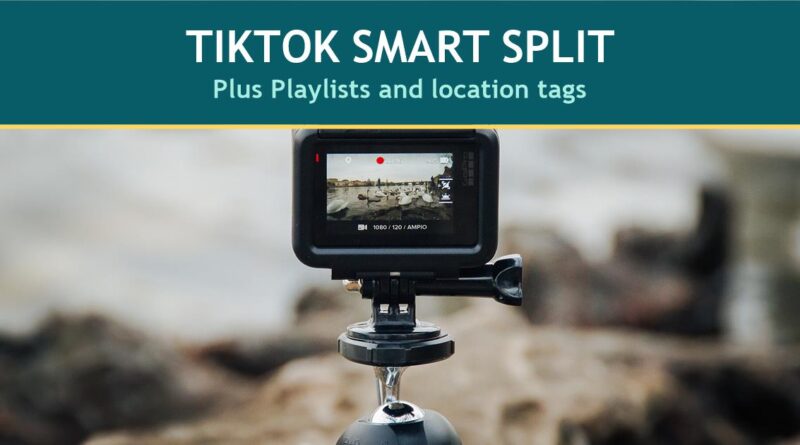
Photo: Fabrizio Verrecchia, Wikimedia Commons (CC0).
TikTok Smart Split turns a long video into several short clips, and it sits alongside two other TikTok Studio features many creators overlook: Playlists, which group videos into sets, and location tags, which put a real place on a post.
This guide explains what TikTok Smart Split, Playlists and location tags do, who can use each and the exact steps TikTok gives. It is based on TikTok’s Newsroom announcement of Smart Split and three Creator Academy articles: Smart Split, Playlists and the location feature, all read on October 8, 2026. TikTok changes eligibility often, so treat the numbers as a snapshot.
What to know:
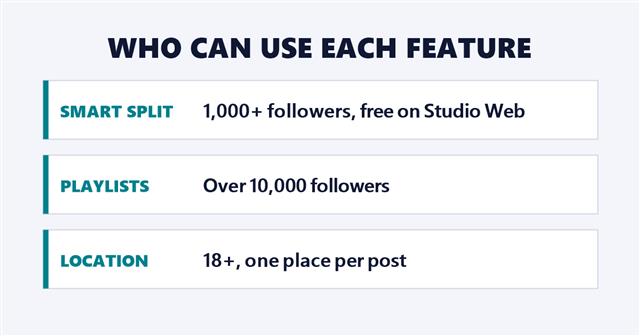
- TikTok Smart Split: an AI tool on TikTok Studio Web that clips, reframes, captions and transcribes longer videos. Per Creator Academy it needs 1,000 or more followers and allows 150 minutes of conversion a month.
- Playlists: sets of videos on one theme. Per Creator Academy, currently for creators with over 10,000 followers.
- Location tags: one place per post, for users 18 and older in a list of countries that includes the United States, Great Britain, Germany and Japan.
In this article
TikTok Smart Split: Turn a Long Video Into Short Clips
TikTok announced Smart Split at its U.S. Creator Summit, in a Newsroom post dated October 28, 2025. TikTok describes it as an AI-powered editing tool that “automatically clips, reframes, captions, and transcribes longer content into multiple short videos ready for TikTok.” Its examples are a day-in-the-life vlog or a podcast episode cut into several clips.
Creator Academy lists the benefits in three lines: it can “save time and money,” giving you “a free personal assistant,” it makes it easier to stay consistent, and it is “available on TikTok Studio Web at no cost.” TikTok’s own explainer video is below.
@creatoracademy Discover how Smart Split can take your videos to the next level. We can’t wait to see what you share next! 💫 #CreatorAcademy
♬ original sound – TikTok Creator Academy – TikTok Creator Academy
Credit: @creatoracademy/TikTok.
How to Use TikTok Smart Split
Creator Academy says TikTok Smart Split is “currently available to creators with 1k+ followers” and converts “up to 150 minutes of content every month,” with the allowance refreshing monthly. The steps TikTok gives:
- Open TikTok Studio Web. Press “Try now” on the banner at the top of the upload page, or go to Tools in the bottom right and click Smart Split.
- Upload or drag your file. The limits are 30GB and 60 minutes.
- Select which part of the video you want to convert.
- Set the clip length to “Auto” to let TikTok Smart Split choose, or pick a specific length.
- Choose a caption format for auto-captioning.
- Check “Automatically crop horizontal videos into vertical clips” if you want it to reframe, or leave it unchecked to keep the video horizontal.
- Press “Smart Split” and wait for the conversion.
- Manage the results: select videos to post, edit or download. TikTok says “Retry” gives a new set of clips but counts toward your monthly conversion time.
- Post any clip straight to your TikTok account.
The Newsroom post adds two details: creators upload content over one minute long, and videos made with Smart Split “will go through moderation before being posted,” like all TikTok content.
TikTok Playlists: Organize Videos Into Sets
Playlists let you “organize your videos into categorized sets,” per Creator Academy. When a video is in a Playlist, it carries a link to the full set, so a viewer who likes one video can jump to a Playlist Details page and swipe through the rest “just like they would on their For You feed.” TikTok says this “gets you more views,” which is TikTok’s claim, not a measured result.
Who can make one
“The Playlist feature is currently only available to creators with over 10k followers on TikTok,” per Creator Academy.
How to create and manage one
- Open your Profile and tap the upload button, or open TikTok Studio and tap Playlist. Choose a name of up to 25 characters.
- Use a shared theme as the name. TikTok’s examples are “Leg Day” for a fitness creator and Get-Ready-With-Me videos, hauls or product reviews for a beauty creator.
- Add videos from your Profile (Menu, Edit playlist, Add to playlist), through TikTok Studio (Playlist under Tools) or before you post (More options, then Add to playlist).
- There is no limit on the number of videos, you can add up to 100 at a time, and each video can be in only one Playlist.
- The default order is oldest to newest by the date a video was added. Press and hold a video to drag it somewhere else.
- To delete a Playlist, open it from the Posts tab, tap More options, then Delete playlist. TikTok says deleting a Playlist does not delete the posts in it.
Location Tags: Put a Place on Your Post
TikTok says location tags can “increase your discoverability” and make a creator seem “more authentic” by helping viewers picture them out in the real world. When a viewer taps a location tag, TikTok says they can see the place’s address, reviews and other posts that used the same tag. For how this fits TikTok’s travel push, see the TikTok Halloween travel guide.
How to add one
You add a location right before publishing. TikTok says to select one of the recommended options or click the arrow to search for a place. The same option is in the TikTok Studio web version’s upload flow.
The three conditions
- Country: Creator Academy lists dozens of eligible countries, including the United States, Great Britain, Germany, Japan, Brazil, France, Canada, Mexico, South Korea, Italy and Australia.
- Age: you must be 18 or older.
- One location per post.
Which Feature Fits What You Make
This part is this site’s suggestion, not TikTok’s:
- You publish long videos or podcasts: TikTok Smart Split is the fastest way to get short clips from them. It is free and open at 1,000 followers.
- You make series, such as recipes or workouts: Playlists keep a series together, once you pass 10,000 followers.
- You film in real places: location tags help viewers find the spot, and the tag works for any creator over 18 in an eligible country.
Pair them with TikTok’s idea tools in TikTok Video Ideas: 4 Tools That Show What to Post and its editor in TikTok Templates: How to Use Them and Make Your Own.
Limits to Know
- Follower thresholds can change. The 1,000 and 10,000 figures are what TikTok’s articles say now.
- AI results vary. TikTok Smart Split is an AI tool, and the Creator Academy article does not say how accurate its clip choices are, so review every clip before posting.
- Smart Split has a monthly cap. Retries use up the same 150 minutes.
- Location is not everywhere. Creators in countries outside TikTok’s list cannot use it yet, and TikTok says to “stay tuned” for more.
Frequently Asked Questions
What is TikTok Smart Split?
TikTok Smart Split is an AI editing tool on TikTok Studio Web that turns a longer video into multiple short, captioned clips. TikTok announced it on October 28, 2025.
Is TikTok Smart Split free?
Creator Academy says it is available on TikTok Studio Web “at no cost,” with 150 minutes of conversion a month.
How many followers do I need for TikTok Smart Split?
Creator Academy says 1,000 or more followers.
How many followers do I need for TikTok Playlists?
Per Creator Academy, over 10,000 followers, currently.
Can I add more than one location to a TikTok?
No. TikTok says you can only add one location per post, and you must be 18 or older.
Sources: TikTok Newsroom and TikTok Creator Academy articles Smart Split, Playlists and location feature, read October 8, 2026.