TikTok Video Covers: What Creator Academy Says About Thumbnails and a Posting Routine (2026)
TikTok’s Creator Academy treats the picture people see before they press play as part of a creator’s brand. Its page on TikTok video covers says a profile “can be a major traffic source,” so “having engaging, high-quality thumbnails is incredibly important,” and that covers are “key to establishing your brand, leveling up your professionalism, and making your account more memorable.”
This guide to TikTok video covers reports what TikTok says on two pages: Leveraging high-quality video covers to attract viewers and Building a sustainable posting routine with these 3 tips. The second page is included in this guide to TikTok video covers because TikTok ties consistent covers to a consistent routine. Every tip below is credited to TikTok.
TikTok video covers at a glance:
In this article
- Make your own: “Instead of using the default thumbnail when you go to post your content, create or upload a personalized cover!”
- Size: TikTok recommends “a 9×16 aspect ratio and a 1080×1920 pixel resolution” for covers that feature the creator.
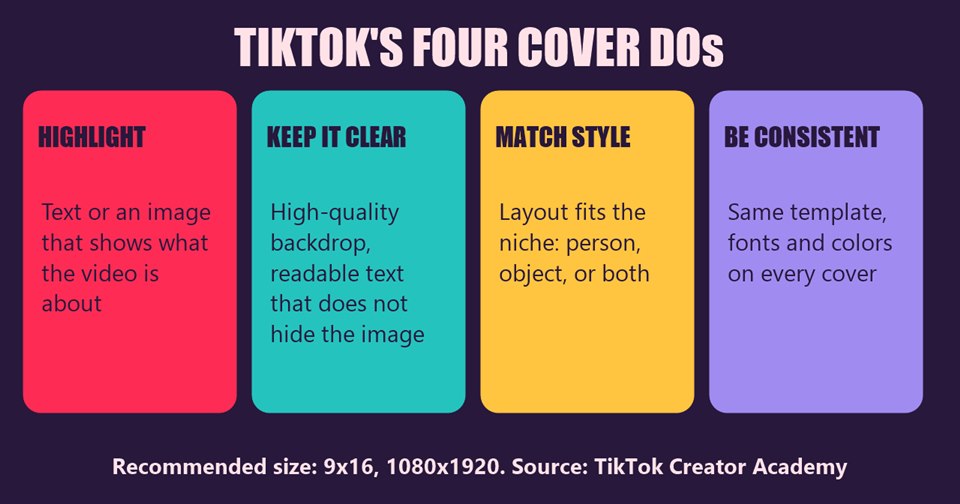
- Four DOs: highlight key information, keep it clear and good-looking, match your content style, stay consistent.
- Routine: TikTok says “consistency matters more than perfection” and says creators can schedule posts in TikTok Studio on the web “up to 30 days in advance.”
Why TikTok Video Covers Matter
TikTok links TikTok video covers to its advice on profile traffic. The cover page points to TikTok’s separate guide on maximizing profile traffic, and says personalized covers help establish a brand and make an account “more memorable.” The page does not give a figure for how much traffic covers drive.
How to Make and Upload TikTok Video Covers
For TikTok video covers, TikTok names two routes: its own “cover editing tool,” or “the wide range of image templates available in CapCut,” to create “a cover that fits your brand just right.” This site covers CapCut in CapCut for TikTok.
For a cover made in advance, TikTok gives the upload path: click the plus button on TikTok, choose “cover editing,” and then “upload local cover” to insert the cover.
TikTok Video Covers: The Four DOs
1. Highlight key information on TikTok video covers
TikTok says text on a cover, or “images that clearly reflect the content of your video,” help “users quickly find videos that interest them as they scroll through your profile.” Two ways it gives:
- “Choose a clear picture of the person or object as the visual focus.”
- “Summarize the core video information into text. Match your font style to your content’s aesthetic.” TikTok adds that for professional niches like tech, knowledge or legal, creators should “stay away from funky fonts.”
2. Make it clear and aesthetically pleasing
TikTok says to “use high-quality images as the backdrop for your cover, and design your text so that it’s easy to read but doesn’t take up the whole screen or obscure the images behind it.” People or objects should be positioned well in the frame, “not too close up and not too far away.” TikTok also says to stick to “the same font” and to pick text colors that pair well with the image. Of templates, it says they “can be your best friend for creating consistent, aesthetically pleasing video covers!”
3. Match your content style
TikTok says TikTok video covers are “your opportunity to advertise your content to viewers, so they should reflect your video style and your niche.” It gives three layouts:
- Videos that feature the creator: center the cover around the creator, using a thumbnail from the video. TikTok recommends “a 9×16 aspect ratio and a 1080×1920 pixel resolution,” and says to add text “that highlights the theme of the video without obscuring yourself.”
- Videos that feature objects: “choose a high-quality thumbnail of the main object from your video,” a shot that is “attention-grabbing and clearly shows the object,” with text “around the object to provide context.”
- Videos that feature both: “splice images together to build your cover,” edited vertically, with text “in the middle of the images” and no black margin.
Text size and the safety zone
TikTok says “regular text in videos usually fits well in a 40 to 50 pixel font size, so a short video title should be a larger size.” It also tells creators to work “within the safety zone,” defined as “the area of your frame that won’t be covered by For You feed elements like buttons, your name, your caption, etc.” TikTok’s rule of thumb: “avoid placing elements around the edges of your frame.” For green screen videos, it points to its separate green screen DOs and DON’Ts.
4. Stay consistent
On TikTok video covers, TikTok says “having a consistent cover layout makes your profile look more put together. Use the same template every time you post to build an eye-catching profile that gets users to click on more of your content.” Its tip: “avoid mixing personal and professional content on your account. Sticking to your content niche lets viewers know what to expect from you.”
TikTok Video Covers: The Four DON’Ts
The page on TikTok video covers ends with four mistakes, again in TikTok’s words:
- Don’t use blurry images. “Choose high-quality, clear images and thumbnails to make your covers look more professional.”
- Don’t forget to provide context. Use text that states the theme of the video, with “How to bake bread in five steps” as TikTok’s example, or text that makes people curious, such as “The BEST red carpet outfits.”
- Don’t forget the importance of great layout. TikTok lists the steps: use high-quality stills, keep the subject “evenly proportioned in the middle of the screen in a 9×16 frame,” keep text in frame, do not block the subject with text, and choose a text size “that’s not too big or too small.”
- Don’t mix and match styles and aesthetics. “Use the same fonts, text size, colors, and image styles to keep your profile looking clean and intentional.”
On layout, TikTok adds: “Keep your text simple and use the same text template for each video. Too many words or too many different text colors and fonts can look messy, which could deter potential viewers.”
TikTok’s Three-Tip Posting Routine
The routine page, which TikTok ties to consistent TikTok video covers, opens with a claim and a plan. TikTok says: “On TikTok, consistency matters more than perfection! Viewers are more likely to connect when you create authentic content and post frequently.” It says “simple planning habits, such as batching your content and staying on top of trends, can make a huge difference.” It then gives three tips.
Tip 1: Collect Content Ideas
TikTok says “the first step in creating consistent content is to always have ideas for your next video.” Its suggestions:
- Keep “a journal or a dedicated notes page on your phone” for ideas and inspiration.
- Follow popular content on the For You feed and trending news topics, and note ideas relevant to your niche.
- Use the Creation inspiration tab in TikTok Studio and the trending topics tab, which “view popular content tailored to your niche.” This site explains those tools in TikTok Video Ideas: The Tools TikTok Offers and TikTok Studio explained.
- Use Creator Search Insights to “identify trending search topics with low supply, then turn those topics into videos that viewers are waiting to see!” This site covers it in TikTok Creator Search Insights.
Tip 2: Create Repeatable Formats
TikTok says formats help “ensure you never run out of ideas” and are “a great strategy for building brand recognition,” since “viewers are more likely to remember you and follow along when they know what type of content to expect from you.” It suggests organizing a series into a Playlist, which this site covers in TikTok Smart Split, Playlists and Location Tags. TikTok’s ideas:
- A storytelling format: “hook + go in-depth + call-to-action.”
- A format on a specific day: for example, sharing meal prep every Sunday, or teaching a new drill every Tuesday.
- Respond to comments with a video: “set aside one day of your posting schedule” for it.
- Use trends: after an in-depth video, “plug that topic into a relevant trend.”
Tip 3: Build a Dependable Production Routine
TikTok says “if you want to stick to your posting schedule, make filming and editing your content as easy as possible!” Its six suggestions:
- Set aside filming days. “Dedicate one or two days in your schedule to filming your content.”
- Have a consistent setup. A designated area that is “always ready for filming,” so there is no need to set up a tripod, lighting or background each time. This site’s TikTok filming tips guide covers TikTok’s lighting and framing advice.
- Use a script. “Map out key talking points to help you film your content in just a few takes.” TikTok adds: “Use a teleprompter to make this process even easier!”
- Batch your workflow. “Film multiple videos in one location before moving to the next.”
- Use the schedule post feature. In TikTok Studio on the web, “schedule your posts up to 30 days in advance and make sure you’re reaching your viewers when they’re most active.”
- Keep a consistent editing style. “Use the same pacing, fonts, filters, subtitles, and video covers.” TikTok adds that repeating outfits “helps people recognize you when you appear on their feeds the second or third time.”
The page ends with a suggestion to try one or two of the ideas over the next week and see how they affect the workflow, then “keep stacking these tips to build a posting routine that allows you to stay consistent.”
Other guides on this site that draw on TikTok’s Creator Academy, alongside these tips on TikTok video covers:
- CapCut for TikTok: Editing, Effects and Captions
- TikTok Filming Tips: Lighting, Framing and Camera Moves
- TikTok Audio Tips: Mics, Soundproofing and the Clean Track Method
- TikTok Templates: How to Use Them and Make Your Own
- TikTok Studio: What the App, Web and In-App Versions Offer
What TikTok’s Pages Do Not Say
- The pages on TikTok video covers do not say how much a personalized cover changes profile views, follows or watch time.
- The cover page does not say whether covers affect what the For You feed recommends. Its focus is the profile grid.
- The routine page does not say how often to post. TikTok’s wording is “post frequently” and “consistency matters more than perfection.”
- The pages do not give a limit on how many covers a creator can change or how often.
Frequently Asked Questions
What size should TikTok video covers be?
For covers that feature the creator, TikTok recommends a 9×16 aspect ratio and a 1080×1920 pixel resolution.
How do I upload custom TikTok video covers?
TikTok says to click the plus button, choose “cover editing,” then “upload local cover.”
What is the safety zone on TikTok video covers?
TikTok defines it as “the area of your frame that won’t be covered by For You feed elements like buttons, your name, your caption, etc.” Its advice is to avoid placing elements around the edges.
Can I schedule TikTok posts in advance?
TikTok’s routine page says creators can use TikTok Studio on the web to schedule posts “up to 30 days in advance.”
How often should I post, per TikTok?
The page does not give a number. It says viewers connect when creators “post frequently,” and that consistency matters more than perfection.
Sources: TikTok Creator Academy: Leveraging high-quality video covers to attract viewers and Building a sustainable posting routine with these 3 tips (both read October 30, 2026).